
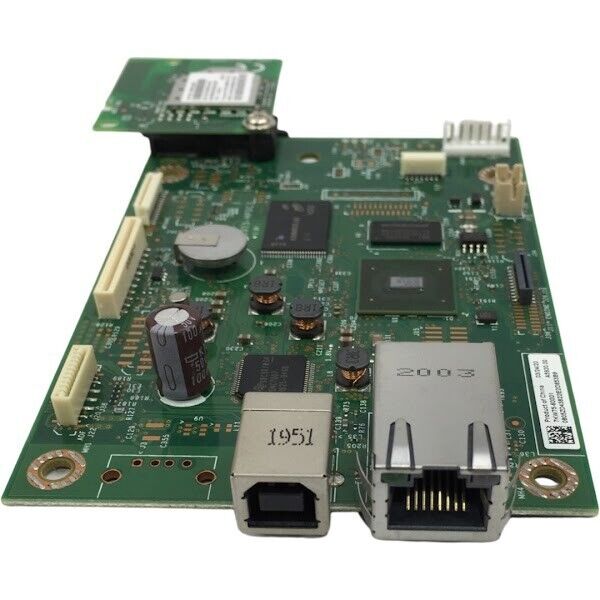
HP Color LaserJet Pro M283FDW M283CDW Formatter Board 7KW75-60001
One board coordinates the entire experience.
The formatter processes print data, manages firmware and system startup, communicates with the touchscreen and coordinates Ethernet, USB and wireless connectivity. Failure of this board can prevent an otherwise functional printer from completing its startup process or communicating with connected devices.
Different designation. Identical functionality.
The HP M283fdw and M283cdw are functionally identical. There is no difference whatsoever in their operational printing, scanning, copying, faxing, duplexing, Ethernet, USB, Wi-Fi or touchscreen functionality. The “cdw” name is a channel-specific model designation and does not represent a different formatter-board function.
Controls startup and firmware.
The formatter runs the printer’s primary operating logic, processes incoming jobs and coordinates communication with the print engine and control panel.
Communicates with the touchscreen.
The board processes the graphical interface and sends control information to the touchscreen assembly during startup and normal operation.
Manages wired and wireless access.
The formatter supports the printer’s RJ-45 Ethernet connection, wireless communication and network-related processing.
Restores the primary USB interface.
Replacing the formatter can restore connectivity when the rear USB Type-B port is physically damaged or no longer communicating.
Symptoms associated with formatter failure
These symptoms may indicate a failed formatter after other likely causes have been properly isolated.
| Reported Condition | Possible Formatter-Related Cause |
|---|---|
| Error 49 | Formatter processing, firmware execution or corrupted data-handling failure. |
| Error 79 | Critical firmware, memory or formatter hardware failure that prevents normal operation. |
| No Display or Blank Display | Formatter or video-processing chip failure preventing the graphical interface from reaching the control panel. |
| Wi-Fi Failure | Wireless hardware or formatter communication failure after configuration and antenna-related causes are excluded. |
| Continuous Boot Loop | The formatter cannot complete firmware initialization or communicate successfully with another printer subsystem. |
| Damaged RJ-45 Port | Physical damage to the formatter-mounted Ethernet network connector. |
| Damaged USB Type-B Port | Physical or electrical damage to the formatter-mounted computer USB connection. |
Diagnosis should precede replacement
Error 49 and Error 79 can also be triggered by corrupted print jobs, firmware, drivers, network traffic or attached devices. A blank display can additionally result from a failed control panel, damaged ribbon cable or power-related issue. Confirm the formatter as the failed component before ordering.
Supported printer configurations
| Compatible Printer | Printer Product Number | Formatter Part Number |
|---|---|---|
| HP Color LaserJet Pro MFP M283fdw | 7KW75A | 7KW75-60001 |
| HP Color LaserJet Pro MFP M283cdw | 7KW73A | 7KW75-60001 |
Board identification
| Brand Compatibility | HP Color LaserJet Pro |
|---|---|
| Part Number | 7KW75-60001 |
| Part Type | Formatter PCA / main logic board |
| Condition | New Pull |
| Supported Functions | System processing, firmware startup, touchscreen communication, Ethernet, USB and wireless networking |
| Quantity | One formatter board |
Protect the board during replacement.
Configuration may be required.
Following installation, the printer may require firmware initialization, restoration of network settings, Wi-Fi setup or other configuration. Always confirm USB, Ethernet, wireless, touchscreen, print, scan, copy and fax operation before returning the printer to service.
Included
One New Pull HP M283fdw/M283cdw formatter board, part number 7KW75-60001.
Not included
Printer, touchscreen control panel, power supply, toner, installation service, external cables, covers, brackets, antennas and fasteners are not included unless specifically pictured.
The right logic board for either M283 model.
This listing is for one New Pull 7KW75-60001 formatter board compatible with the functionally identical HP Color LaserJet Pro MFP M283fdw and M283cdw.
Couldn't load pickup availability
Pickup available at WAREHOUSE
Usually ready in 5+ daysPairs well with
In stock! Ships within 5-7 business days.
100% Tested prior to shipment
Warranty Included (1 Year, 2 Year, and 3 Year Extensions available on all Printers)
Lifetime technical support
HP Color LaserJet Pro M283FDW M283CDW Formatter Board 7KW75-60001
Please visit our FAQs page or email Sales@theprinterdepo.com with any questions you may have.
-
Shipping Information
Most orders ship within 48 hours of receipt.
-
Customer Support
Please reach out to us via email or chat box Monday-Friday 8AM-5PM CST.
-
FAQ’s
Please click "Quick Links" at the bottom of the page & open "FAQ's" for more information.
-
Technical Support
All of our products include lifetime technical support via email.
FAQs
Please read our FAQs page to find out more.
How much is shipping?
- Shipping is free on all items below 65lbs
- If you are purchasing in bulk & the total weight exceeds 65lbs then please reach out to us through the chat box or email sales@theprinterdepo.com for a custom quote.
- If the item exceeds 65lbs then you may be subject to freight charges.
Do you charge sales tax?
- We do not collect sales tax outside of the state of Texas. Therefore, you do not need to provide any proof of exemption unless your shipping/billing address is in Texas.
- If you are located in Texas & would like your account to be tax exempt then you must email Sales@theprinterdepo.com your Texas resale certificate or proof of exemption.
Do you offer "Blind Drop Shipping"?
- Yes, we offer "Blind Drop Shipping" & "Private labeling".
- Please email Sales@theprinterdepo.com for more details.
Do you offer any discounts?
- Yes, please sign up for our weekly newsletter for upcoming sales, discount codes, and product announcements.
- Wholesalers should email sales@theprinterdepo.com for a custom quote.
Do you accept "Purchase Orders"?
- Yes, please send your PO's to sales@theprinterdepo.com
- Credit card or Net 30 application must be on file in order for your purchase order to be processed.