
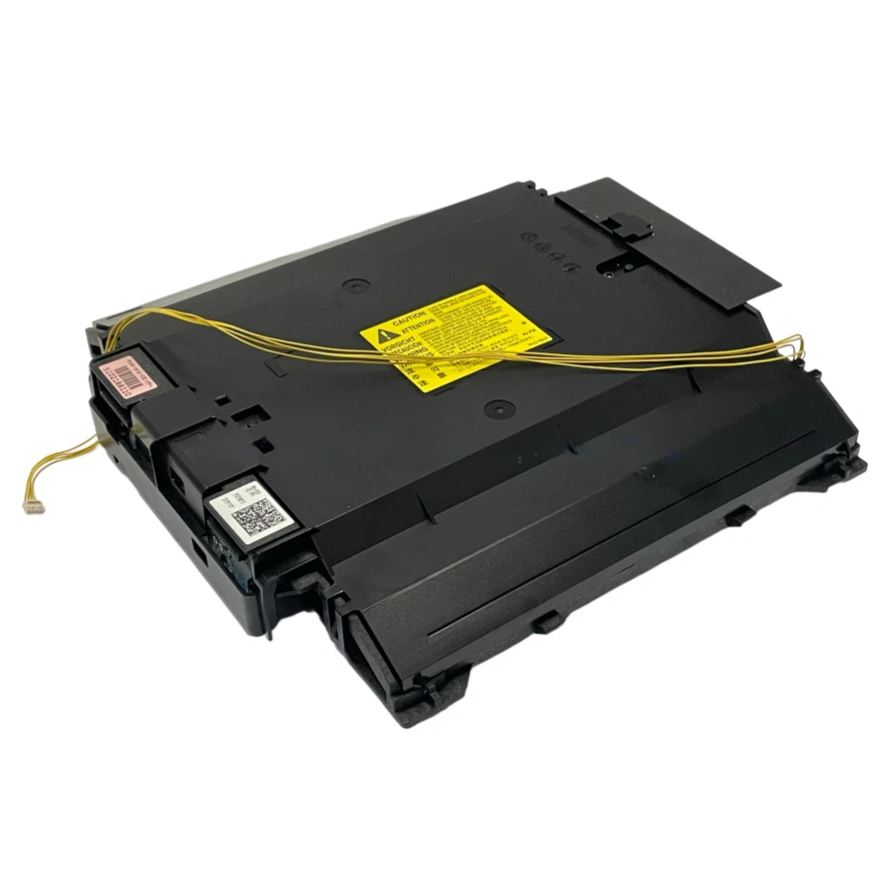
HP Color LaserJet Pro M182/M183/M254/M255/M281/M283 Laser Scanner Assembly – RM2-1918
HP Color LaserJet Pro Replacement Part
Precision starts
with the image.
RM2-1918 Laser Scanner Assembly
Address a diagnosed laser-imaging fault with a replacement laser scanner assembly for the selected HP Color LaserJet Pro model. This internal component forms part of the printing engine, directing laser light onto the imaging drums to create the image that will become your printed page.
Select the correct model before checkout.
This listing offers separate selections for M182 Series, M183 Series, M254 Series, M255 Series, M281 Series, and M283 Series. Choose the option corresponding to your printer and confirm the full model designation, including its letter suffix.
Please ensure the correct model is selected prior to shipment, as selecting the wrong model may result in a denied return.
RM2-1918
Listed part number
Laser Imaging
Print-engine component
6 Options
HP model-family selections
Tested
Prior to shipment
The image begins here.
Inside a laser printer, the laser scanner directs controlled beams of light across the photosensitive drums. This exposure creates the electrostatic image used in the toner-transfer process.
A correctly functioning laser scanner is an essential part of image formation. Replacing a confirmed faulty assembly targets the affected printing component while retaining the rest of the printer.
Diagnose first. Replace precisely.
This assembly is intended for repairs in which testing has identified a laser-scanner fault. A technician should check the printer’s error information, connections, and imaging system before recommending replacement.
Faint output, missing image areas, streaking, or color defects can also originate from toner cartridges, transfer components, electrical connections, or other parts. These symptoms alone do not establish that the laser scanner has failed.
This is the printing laser scanner.
RM2-1918 is an internal laser-imaging assembly. It does not scan original documents from the flatbed glass or automatic document feeder.
If printing from a computer looks correct but scanned files or copies contain defects, diagnose the document-scanning system before ordering this part. RM2-2416 is a document-scanner assembly and should not be treated as an interchangeable part number.
HP Model Selection Guide
Match the name on your printer.
The table below identifies models within the six HP families offered in this listing. It is a selection guide, not a statement that every assembly or hardware revision is interchangeable. Confirm the required assembly against your printer’s product number and the original part label before installation.
| Listing Option | HP Color LaserJet Pro Models |
|---|---|
| M182 Series | MFP M182n MFP M182nw |
| M183 Series | MFP M183fw |
| M254 Series | M254nw M254dn M254dw |
| M255 Series | M255nw M255dn M255dw |
| M281 Series | MFP M281cdw MFP M281fdn MFP M281fdw |
| M283 Series | MFP M283cdw MFP M283fdn MFP M283fdw |
For an unlisted HP model, contact us with the complete model name, product number, and a photograph of the original assembly label before ordering. A shared series name or similar appearance is not sufficient to establish compatibility.
Canon compatibility requires confirmation.
RM2-1918 appears in third-party listings for certain Canon imageCLASS and i-SENSYS printers. A complete manufacturer-verified Canon fitment list has not been established for the assemblies offered here.
Do not select an HP model option for a Canon printer without confirmation. Provide the exact Canon model and the original laser-unit label so the required configuration can be checked before purchase.
Product details.
| Product type | Internal laser scanner assembly / laser scanning unit (LSU) |
|---|---|
| Listed part number | RM2-1918 |
| Primary function | Laser exposure of the imaging drums during printing |
| Location | Inside the printer’s imaging engine |
| Ordering requirement | Select the correct model family and verify the original assembly identification |
| Testing | Tested prior to shipment |
| Installation | Professional printer-service installation recommended |
Handle with care. Install correctly.
- Verify the replacement. Compare the complete part label, connectors, mounting points, and model application before disassembly.
- Disconnect power. Follow the printer’s service instructions and unplug the power cord before removing internal components.
- Protect the optical assembly. Avoid touching optical surfaces, bending ribbon cables, or disturbing factory optical adjustments. Do not operate the printer with the laser scanner’s protective cover removed.
- Follow the model-specific procedure. Route and secure cables correctly, seat the assembly fully, and reinstall all required covers.
- Check the completed repair. Perform the prescribed post-service checks and print diagnostic pages to assess image quality and confirm that the original fault has been resolved.
Check the supplied configuration.
Review the listing photographs and selected option for the assembly being supplied. Separate cables, mounting hardware, brackets, and additional printer components should only be considered included when explicitly identified in the listing.
Match the model. Complete the repair.
Order the RM2-1918 Laser Scanner Assembly for the correct HP model selection. Confirm the original part identification and repair diagnosis before purchasing. Canon and unlisted HP applications require fitment confirmation before ordering.
HP, LaserJet, Canon, imageCLASS, and i-SENSYS are trademarks of their respective owners. Model names are used for identification.
Couldn't load pickup availability
Pickup available at WAREHOUSE
Usually ready in 5+ daysPairs well with
In stock! Ships within 5-7 business days.
100% Tested prior to shipment
Warranty Included (1 Year, 2 Year, and 3 Year Extensions available on all Printers)
Lifetime technical support
HP Color LaserJet Pro M182/M183/M254/M255/M281/M283 Laser Scanner Assembly – RM2-1918
Please visit our FAQs page or email Sales@theprinterdepo.com with any questions you may have.
-
Shipping Information
Most orders ship within 48 hours of receipt.
-
Customer Support
Please reach out to us via email or chat box Monday-Friday 8AM-5PM CST.
-
FAQ’s
Please click "Quick Links" at the bottom of the page & open "FAQ's" for more information.
-
Technical Support
All of our products include lifetime technical support via email.
FAQs
Please read our FAQs page to find out more.
How much is shipping?
- Shipping is free on all items below 65lbs
- If you are purchasing in bulk & the total weight exceeds 65lbs then please reach out to us through the chat box or email sales@theprinterdepo.com for a custom quote.
- If the item exceeds 65lbs then you may be subject to freight charges.
Do you charge sales tax?
- We do not collect sales tax outside of the state of Texas. Therefore, you do not need to provide any proof of exemption unless your shipping/billing address is in Texas.
- If you are located in Texas & would like your account to be tax exempt then you must email Sales@theprinterdepo.com your Texas resale certificate or proof of exemption.
Do you offer "Blind Drop Shipping"?
- Yes, we offer "Blind Drop Shipping" & "Private labeling".
- Please email Sales@theprinterdepo.com for more details.
Do you offer any discounts?
- Yes, please sign up for our weekly newsletter for upcoming sales, discount codes, and product announcements.
- Wholesalers should email sales@theprinterdepo.com for a custom quote.
Do you accept "Purchase Orders"?
- Yes, please send your PO's to sales@theprinterdepo.com
- Credit card or Net 30 application must be on file in order for your purchase order to be processed.