
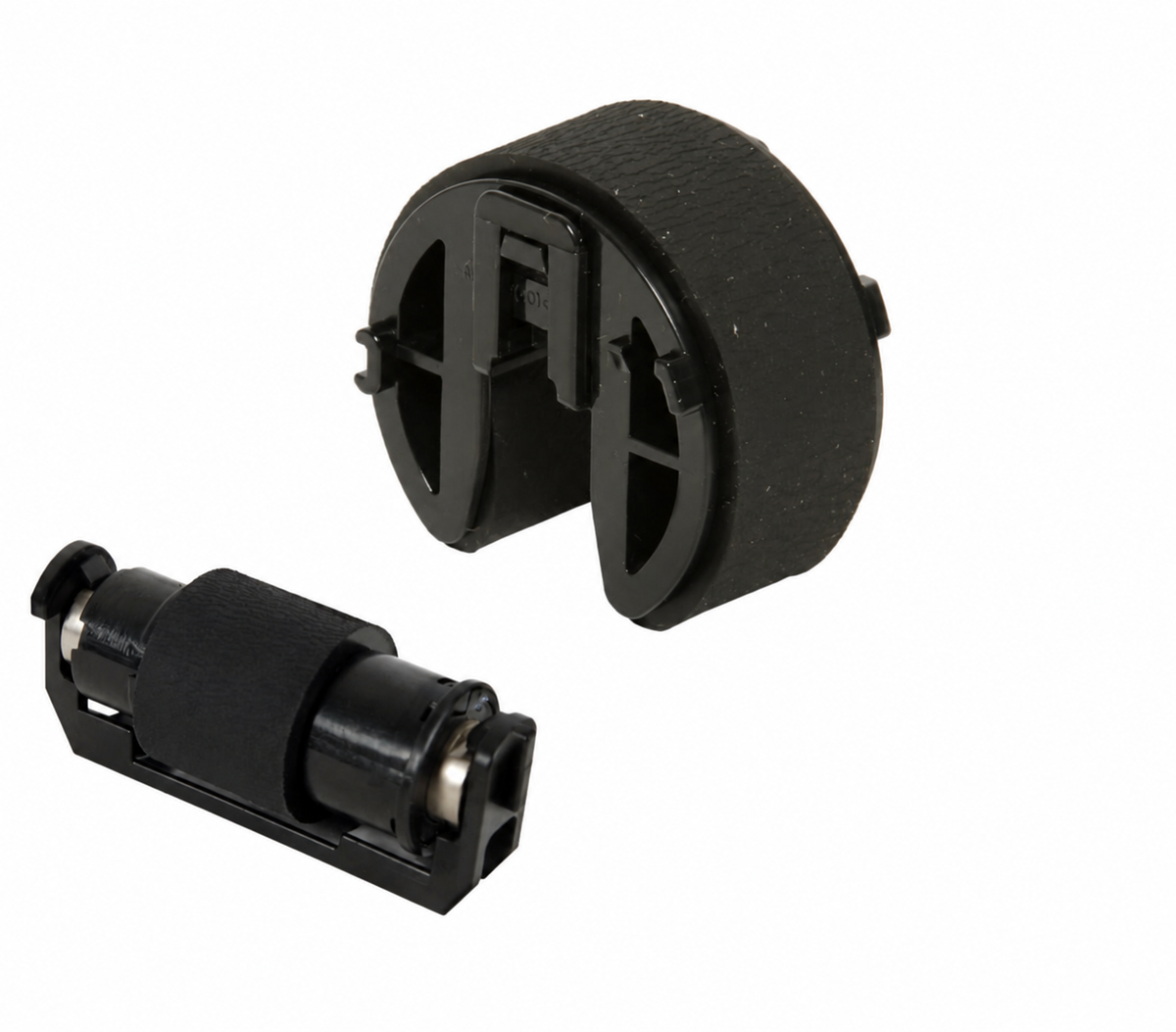
HP CP2025 CM1312 CM2320 M375 M451 M475 M476 Pickup & Separation Roller Kit – CC430-67901
PAPER PICKUP & SEPARATION ROLLER SET
Better feeding.
One sheet at a time.
Refresh the paper pickup and separation components in your compatible HP Color LaserJet or Canon laser printer with this CC430-67901 roller set.
This listing includes one paper pickup roller assembly and one feed/separation roller assembly. The black holder cover, reference RC2-2014-000 / RC2-2014-000CN, is not included. Retain and reuse your existing cover if it is serviceable. This is the roller-only configuration associated with CC430-67901.
Restore paper pickup.
A worn pickup roller can slip against the paper, causing repeated pickup attempts or a failure to feed. Replacing the roller renews the paper-contact surface when roller wear is the cause of the problem.
Support consistent separation.
The separation roller works with the pickup system to help feed individual sheets. Replacing both wear components addresses pickup and separation together when worn rollers cause double-feeding or cassette feed jams.
Part numbers. Clearly identified.
Numbers above identify the kit and related component service references used across the listed applications. They do not represent additional included parts. Match the component, printer model, and feed location before ordering.
Compatible HP printers.
For the cassette paper pickup and separation positions in the following HP Color LaserJet and LaserJet Pro models.
Compatible Canon printers.
Canon uses the corresponding component references in the models below. Regional branding may appear as Color imageCLASS, imageCLASS, i-SENSYS, Laser SHOT, or Satera. Match the complete model designation on your printer.
Check the model. Check the feed location.
These are cassette paper pickup and separation rollers. Tray numbering varies by printer: the main cassette may be labeled Tray 1 or Tray 2. On the CP2025, CM2320, M375, M451, M475, and M476 families, the standard cassette is Tray 2.
This set does not include automatic document feeder rollers or the separate multipurpose-tray roller and separation pad. A shared series number or similar appearance alone does not establish compatibility. For an unlisted regional model or an optional feeder, confirm both roller part numbers before purchasing.
A practical repair for worn feed rollers.
Consider replacing the rollers when the printer repeatedly struggles to pick up paper, feeds multiple sheets, or jams at the cassette entry and inspection confirms worn roller surfaces. Paper condition, tray guides, sensors, clutches, and drive components can cause similar symptoms; roller replacement addresses wear in the rollers themselves.
Follow the service procedure for your exact printer. Some models require positioning the pickup roller through a service menu before removal. Disconnect power before handling internal components, avoid touching the rubber surfaces, and reinstall the existing holder cover correctly. After installation, test paper feeding with properly loaded, supported media.
CC430-67901 Roller Set
One pickup roller. One separation roller.
Holder cover not included.
Match your HP or Canon model and component references before ordering.
HP, LaserJet, Canon, imageCLASS, i-SENSYS, imageRUNNER, Laser SHOT, and Satera are trademarks of their respective owners. Model names and part numbers are used for identification and compatibility reference.
Couldn't load pickup availability
Pickup available at WAREHOUSE
Usually ready in 5+ daysPairs well with
In stock! Ships within 5-7 business days.
100% Tested prior to shipment
Warranty Included (1 Year, 2 Year, and 3 Year Extensions available on all Printers)
Lifetime technical support
HP CP2025 CM1312 CM2320 M375 M451 M475 M476 Pickup & Separation Roller Kit – CC430-67901
Please visit our FAQs page or email Sales@theprinterdepo.com with any questions you may have.
-
Shipping Information
Most orders ship within 48 hours of receipt.
-
Customer Support
Please reach out to us via email or chat box Monday-Friday 8AM-5PM CST.
-
FAQ’s
Please click "Quick Links" at the bottom of the page & open "FAQ's" for more information.
-
Technical Support
All of our products include lifetime technical support via email.
FAQs
Please read our FAQs page to find out more.
How much is shipping?
- Shipping is free on all items below 65lbs
- If you are purchasing in bulk & the total weight exceeds 65lbs then please reach out to us through the chat box or email sales@theprinterdepo.com for a custom quote.
- If the item exceeds 65lbs then you may be subject to freight charges.
Do you charge sales tax?
- We do not collect sales tax outside of the state of Texas. Therefore, you do not need to provide any proof of exemption unless your shipping/billing address is in Texas.
- If you are located in Texas & would like your account to be tax exempt then you must email Sales@theprinterdepo.com your Texas resale certificate or proof of exemption.
Do you offer "Blind Drop Shipping"?
- Yes, we offer "Blind Drop Shipping" & "Private labeling".
- Please email Sales@theprinterdepo.com for more details.
Do you offer any discounts?
- Yes, please sign up for our weekly newsletter for upcoming sales, discount codes, and product announcements.
- Wholesalers should email sales@theprinterdepo.com for a custom quote.
Do you accept "Purchase Orders"?
- Yes, please send your PO's to sales@theprinterdepo.com
- Credit card or Net 30 application must be on file in order for your purchase order to be processed.