
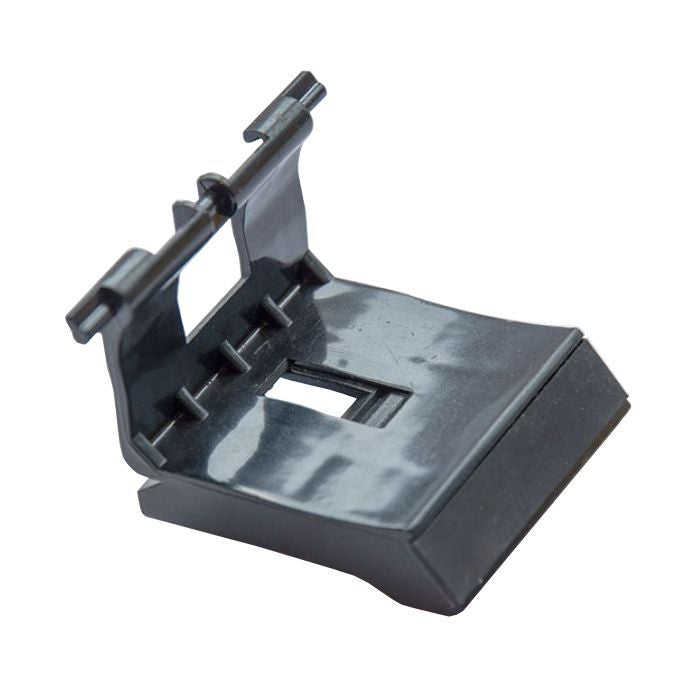
HP LaserJet M1536dnf & Canon MF4770n/MF4880dw Separation Pad RM1-4227 FM4-6893
HP & Canon Paper-Feed Components
Separation Pad Assembly
RM1-4227 / FM4-6893
A replacement paper-feed separation pad assembly for compatible HP LaserJet and Canon printers. For cross-fit installation between these assembly references, retain your original blue base and transfer the black pad-holder.
Help restore single-sheet feeding.
The separation pad helps prevent multiple sheets from entering the printer together. When its friction surface becomes worn, the printer may begin pulling more than one sheet at a time. Replacing the worn pad and holder can help address feeding problems caused by that component.
This is a main paper-feed separation pad for the printer's paper supply. It is not the separation pad used in the automatic document feeder on top of the machine.
Important Installation Requirement
Keep the blue base.
Replace the black holder.
The RM1-4227 / FM4-6893 interchange applies to the black holder that carries the separation pad. When using this cross-reference, reuse the original blue plastic base from your printer and install the replacement black holder with its attached pad.
Do not discard your original blue base. The two complete base assemblies should not be treated as identical, universal drop-in replacements. Transfer the black holder and pad together rather than peeling off and replacing only the friction material.
Retain
Your original blue base
Keep the blue mounting base from the existing assembly. It must remain intact and serviceable for this cross-fit method.
Replace
The black holder and pad
Replace the black plastic component that holds the separation pad, keeping the replacement friction pad attached to its holder.
Part details
| HP assembly reference | RM1-4227 / RM1-4227-000CN |
|---|---|
| Canon assembly reference | FM4-6893 / FM4-6893-000 |
| Component | Paper-feed separation pad and holder assembly |
| Location | Main paper-feed / paper pickup area; not the automatic document feeder |
| Cross-fit requirement | Reuse the printer's original blue base and transfer the black holder with its separation pad |
| Quantity | One replacement separation pad assembly |
Compatible model applications
The models below use one of the original assembly references shown above. Compatibility across the HP and Canon references requires the black-holder transfer and original-blue-base reuse described in this listing.
HP
LaserJet Pro
- HP LaserJet Pro M1536dnf MFP
Original assembly reference: RM1-4227-000CN.
Canon
MF4700 & MF4800 Series
- Canon MF4720w
- Canon MF4730
- Canon MF4750
- Canon MF4770n
- Canon MF4820d
- Canon MF4830d
- Canon MF4870dn
- Canon MF4880dw
- Canon MF4890dw
Original assembly reference: FM4-6893-000. Retain the Canon blue base when installing the replacement black holder and pad.
Check the original assembly before ordering.
Confirm the exact printer model, original assembly reference, and condition of the blue base. This transfer method is not a solution for a missing, cracked, or broken original base. A similar appearance alone does not establish compatibility with an unlisted model.
Cross-fit installation overview
- Prepare the printer. Turn it off, disconnect the power cord, and allow it to cool. Access and remove the existing separation pad assembly using the service procedure for your exact model.
- Retain the original blue base. Keep the base and original mounting hardware. Carefully remove the worn black pad-holder without damaging the base.
- Transfer the replacement black holder. Install the black holder with its separation pad into the original blue base. Keep the pad attached to its holder and avoid touching the friction surface.
- Reassemble and test. Confirm the holder is correctly seated, reinstall the assembly, and test paper feeding. Do not force a component that does not seat correctly.
This overview explains the holder-transfer requirement; it does not replace the model-specific service procedure. Paper condition, pickup-roller wear, and other feed-system issues should also be checked when diagnosing persistent feeding problems.
What you receive
One replacement separation pad assembly for the paper-feed applications described above. This listing is not a pickup-roller kit, automatic document feeder kit, or complete paper pickup mechanism.
For RM1-4227 / FM4-6893 cross-fit installation, your original blue base must be reused. Replace the black holder and its attached separation pad.
Couldn't load pickup availability
Pickup available at WAREHOUSE
Usually ready in 5+ daysPairs well with
In stock! Ships within 5-7 business days.
100% Tested prior to shipment
Warranty Included (1 Year, 2 Year, and 3 Year Extensions available on all Printers)
Lifetime technical support
HP LaserJet M1536dnf & Canon MF4770n/MF4880dw Separation Pad RM1-4227 FM4-6893
Please visit our FAQs page or email Sales@theprinterdepo.com with any questions you may have.
-
Shipping Information
Most orders ship within 48 hours of receipt.
-
Customer Support
Please reach out to us via email or chat box Monday-Friday 8AM-5PM CST.
-
FAQ’s
Please click "Quick Links" at the bottom of the page & open "FAQ's" for more information.
-
Technical Support
All of our products include lifetime technical support via email.
FAQs
Please read our FAQs page to find out more.
How much is shipping?
- Shipping is free on all items below 65lbs
- If you are purchasing in bulk & the total weight exceeds 65lbs then please reach out to us through the chat box or email sales@theprinterdepo.com for a custom quote.
- If the item exceeds 65lbs then you may be subject to freight charges.
Do you charge sales tax?
- We do not collect sales tax outside of the state of Texas. Therefore, you do not need to provide any proof of exemption unless your shipping/billing address is in Texas.
- If you are located in Texas & would like your account to be tax exempt then you must email Sales@theprinterdepo.com your Texas resale certificate or proof of exemption.
Do you offer "Blind Drop Shipping"?
- Yes, we offer "Blind Drop Shipping" & "Private labeling".
- Please email Sales@theprinterdepo.com for more details.
Do you offer any discounts?
- Yes, please sign up for our weekly newsletter for upcoming sales, discount codes, and product announcements.
- Wholesalers should email sales@theprinterdepo.com for a custom quote.
Do you accept "Purchase Orders"?
- Yes, please send your PO's to sales@theprinterdepo.com
- Credit card or Net 30 application must be on file in order for your purchase order to be processed.