
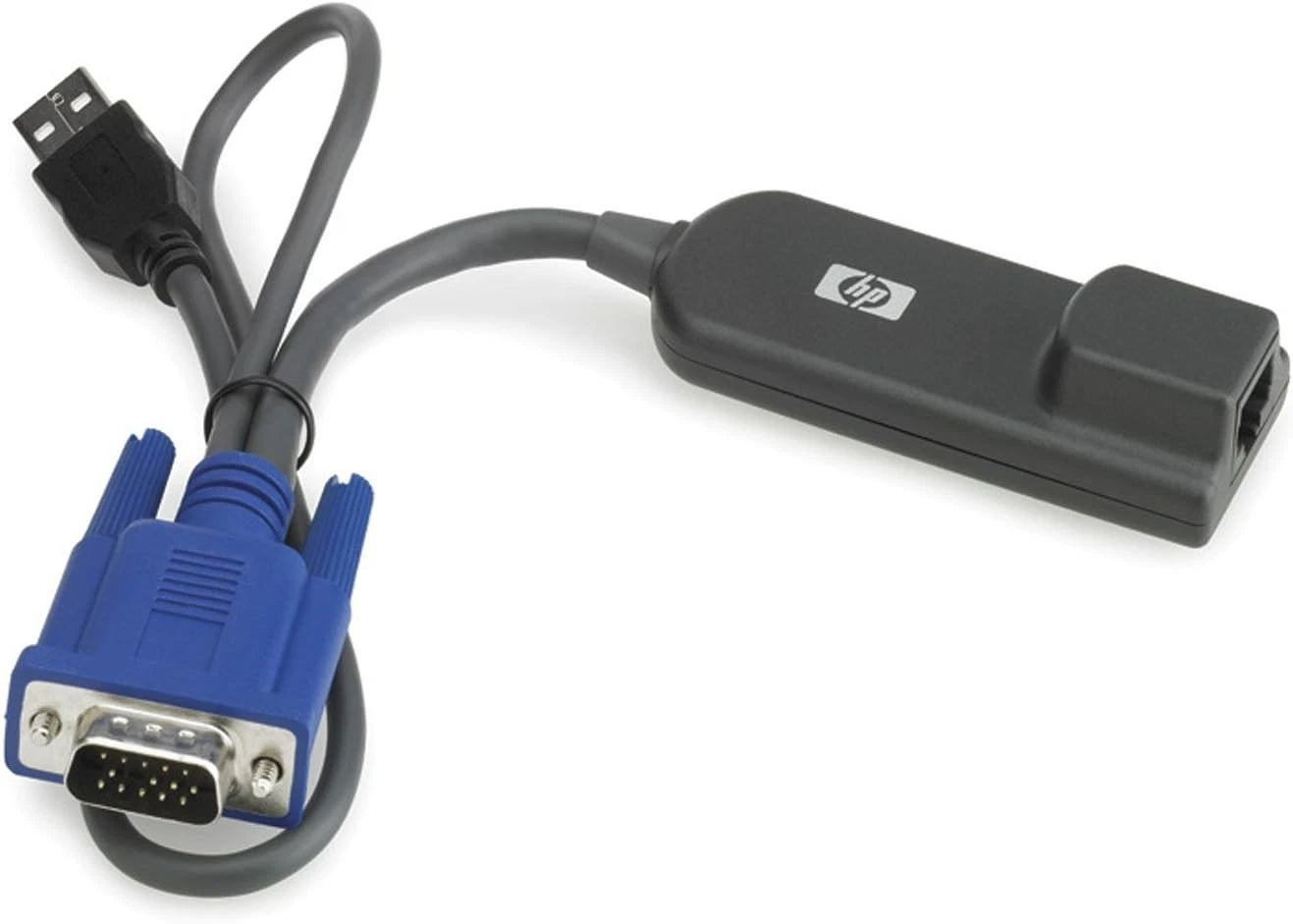
HP 336047-B21 USB VGA to RJ45 CAT5 KVM Interface Adapter Cable for ProLiant Servers
HP Enterprise Connectivity
Simplify your server management.
HP KVM USB Interface Adapter Cable
One connection. Centralized control.
The HP 336047-B21 KVM USB Interface Adapter is designed to connect compatible servers to supported HP and HPE CAT5 KVM console switches, enabling centralized keyboard, video, and mouse management.
Featuring integrated USB Type-A and VGA connectors alongside an RJ-45 interface, this compact adapter consolidates essential server console connections into a streamlined CAT5-based KVM infrastructure. Ideal for enterprise server rooms, data centers, rack installations, and IT maintenance environments.
Centralized Management
Access compatible servers through a shared HP KVM console without requiring separate monitors, keyboards, and mice.
Integrated USB + VGA
Combines USB keyboard/mouse connectivity and analog VGA video into a single server-side interface adapter.
CAT5 Connectivity
Designed for structured server-rack installations using compatible CAT5e cabling and HP/HPE KVM switching equipment.
Technical Details
Specifications.
| Manufacturer | HP / Hewlett Packard Enterprise |
| Part Number | 336047-B21 |
| Product Type | KVM USB Interface Adapter |
| Server USB Connector | 1 × USB Type-A Male |
| Server Video Connector | 1 × VGA HD-15 Male |
| KVM Interface | 1 × RJ-45 Female |
| Connection Method | Wired CAT5/CAT5e KVM |
| Installation Type | External Adapter |
| Primary Application | Enterprise Server Console Management |
Compatibility
Designed for HP server environments.
The 336047-B21 adapter is intended for compatible HP/HPE CAT5 KVM console switching systems and servers equipped with USB and VGA connections.
Applicable Server Families
- HP ProLiant DL Series Rackmount Servers
- HP ProLiant ML Series Tower Servers
- Select HP ProLiant and BladeSystem Environments
- Other supported servers with USB and VGA console interfaces
KVM System Requirements
- Compatible HP/HPE CAT5 Server Console Switch
- Supported USB/VGA server-side connections
- Appropriate CAT5e interconnect cable
- Available compatible server port on the KVM switch
Compatibility is determined by the KVM console switch as well as the server connections. Physical connector compatibility alone does not guarantee support. Please verify the switch model before purchasing.
Installation
A streamlined connection.
Attach the USB Type-A and VGA connectors to the corresponding ports on the server.
Connect a suitable CAT5e cable between the adapter's RJ-45 port and a supported KVM switch server port.
Use the connected HP/HPE KVM console switch to select and manage the server.
Important Compatibility Notes
Dedicated KVM connection: The RJ-45 interface is intended for supported KVM systems. It is not a standard Ethernet network adapter, Ethernet extender, or general-purpose USB-to-RJ45 converter.
Virtual media compatibility: This adapter should not be assumed to provide virtual media, CAC authentication, or other features requiring a different interface adapter.
Included item: One HP 336047-B21 KVM USB Interface Adapter. Server hardware, KVM console switch, and separate CAT5e interconnect cables are not included unless otherwise specified.
Enterprise Infrastructure Essentials
Small adapter. Essential connection.
A practical connectivity solution for maintaining and expanding compatible HP/HPE server management environments.
Professionally fulfilled by The Printer Depot.
Couldn't load pickup availability
Pickup available at WAREHOUSE
Usually ready in 5+ daysPairs well with
In stock! Ships within 5-7 business days.
100% Tested prior to shipment
Warranty Included (1 Year, 2 Year, and 3 Year Extensions available on all Printers)
Lifetime technical support
HP 336047-B21 USB VGA to RJ45 CAT5 KVM Interface Adapter Cable for ProLiant Servers
Please visit our FAQs page or email Sales@theprinterdepo.com with any questions you may have.
-
Shipping Information
Most orders ship within 48 hours of receipt.
-
Customer Support
Please reach out to us via email or chat box Monday-Friday 8AM-5PM CST.
-
FAQ’s
Please click "Quick Links" at the bottom of the page & open "FAQ's" for more information.
-
Technical Support
All of our products include lifetime technical support via email.
FAQs
Please read our FAQs page to find out more.
How much is shipping?
- Shipping is free on all items below 65lbs
- If you are purchasing in bulk & the total weight exceeds 65lbs then please reach out to us through the chat box or email sales@theprinterdepo.com for a custom quote.
- If the item exceeds 65lbs then you may be subject to freight charges.
Do you charge sales tax?
- We do not collect sales tax outside of the state of Texas. Therefore, you do not need to provide any proof of exemption unless your shipping/billing address is in Texas.
- If you are located in Texas & would like your account to be tax exempt then you must email Sales@theprinterdepo.com your Texas resale certificate or proof of exemption.
Do you offer "Blind Drop Shipping"?
- Yes, we offer "Blind Drop Shipping" & "Private labeling".
- Please email Sales@theprinterdepo.com for more details.
Do you offer any discounts?
- Yes, please sign up for our weekly newsletter for upcoming sales, discount codes, and product announcements.
- Wholesalers should email sales@theprinterdepo.com for a custom quote.
Do you accept "Purchase Orders"?
- Yes, please send your PO's to sales@theprinterdepo.com
- Credit card or Net 30 application must be on file in order for your purchase order to be processed.