
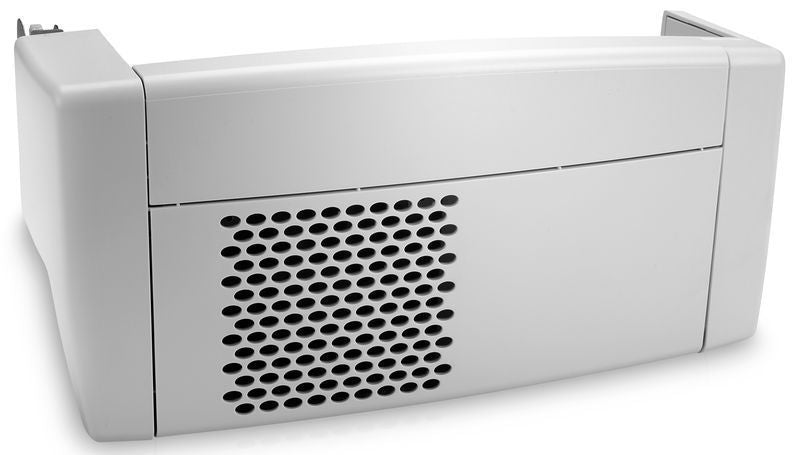
HP LaserJet M604 M605 M606 M605dnm M605xm Automatic Duplex Unit – F2G69A
HP LASERJET AUTOMATIC DUPLEX UNIT
Two sides.
Less paper.
Add automatic two-sided printing to a compatible HP LaserJet, or replace its existing duplex assembly. The F2G69A handles the second side automatically, making everyday documents easier to print and store.
M604n and M605n: The F2G69A adds optional automatic duplex printing. Duplex-equipped models: Use it as a replacement for a missing or faulty compatible assembly. Installing a duplexer does not change the printer's official model designation.
Two-sided printing
Fewer sheets per document*
Listed compatibility
Supported duplex paper weight
*Compared with printing the same document on one side of each sheet. A 20-page document uses 10 sheets when printed two-sided. Savings depend on page count, settings and suitable media; duplexing does not reduce toner use by the same percentage.
Make every sheet go further.
The HP F2G69A duplex unit routes paper through the printer for printing on the reverse side, eliminating manual flipping and reloading for supported jobs. It is a practical addition for reports, training materials, office correspondence and other multipage documents.
Less handling.
Select two-sided printing in a supported print driver and let the printer handle the reverse side. Choose the appropriate binding edge for portrait or landscape documents.
More compact documents.
Reduce the number of sheets used for suitable jobs, helping keep printed reports, folders and stored documents more manageable.
Compatible HP printers.
Match the printer's full model name and base product number to the table below. Regional suffixes, such as #BGJ, may appear after the base product number.
| Compatible printer | Product number | Typical use |
|---|---|---|
| HP LaserJet Enterprise M604n | E6B67A | Optional duplex upgrade |
| HP LaserJet Enterprise M604dn | E6B68A | Replacement duplex unit |
| HP LaserJet Enterprise M605n | E6B69A | Optional duplex upgrade |
| HP LaserJet Enterprise M605dn | E6B70A | Replacement duplex unit |
| HP LaserJet Enterprise M605x | E6B71A | Replacement duplex unit |
| HP LaserJet Enterprise M605dh | L4W89A | Replacement duplex unit |
| HP LaserJet Enterprise M606dn | E6B72A | Replacement duplex unit |
| HP LaserJet Enterprise M606x | E6B73A | Replacement duplex unit |
| HP LaserJet Managed M605dnm | L3U53A | Replacement duplex unit |
| HP LaserJet Managed M605xm | L3U54A | Replacement duplex unit |
Similar-looking duplex units from other LaserJet generations should not be assumed interchangeable. Confirm the printer model and assembly number. This accessory provides automatic two-sided printing; it does not add scanning, copying, faxing or paper-tray capacity.
Product specifications.
| Brand | HP |
|---|---|
| Product type | Automatic duplex unit / two-sided printing accessory |
| Accessory part number | F2G69A |
| Function | Automatically routes supported paper for printing on both sides |
| Installation location | Dedicated duplex accessory position at the rear of the printer |
| Printer families | HP LaserJet Enterprise M604, M605 and M606; HP LaserJet Managed M605, as listed above |
| Duplex paper weight | 60–120 g/m² / 16–32 lb bond, subject to supported paper type |
| Common supported sizes | Letter, Legal, A4 and A5. A5 must feed short-edge first; use the appropriate tray configuration. |
| Paper and driver settings | Use duplex-supported media and select the correct size, type and two-sided printing option |
| Performance | Duplex speed depends on the printer model, document and media; it is not the same as the printer's single-sided speed |
Install. Enable. Print both sides.
- Confirm the model. Check the printer label against the compatibility table and follow HP's installation instructions for the F2G69A.
- Fit the assembly. Power down and disconnect the printer as instructed. Remove the duplex accessory cover or existing duplex unit, then install the replacement securely.
- Check printer configuration. Restart the printer and verify that the duplex unit is recognized. Refresh or update the driver's installed-accessory settings if needed.
- Run a test. Load supported plain paper and print a two-page document using automatic two-sided printing. Confirm page orientation and binding-edge settings.
Media matters: A paper size or material supported for single-sided printing is not automatically suitable for duplexing. Check HP's media guidance before using specialty paper. If the duplexer is already installed but two-sided printing is unavailable, check driver settings and media selection before replacing hardware.
HP F2G69A Automatic Duplex Unit
An automatic duplex upgrade for M604n and M605n printers.
A replacement duplex assembly for the compatible Enterprise and Managed models listed above.
This listing is for the duplex accessory, not a printer. Refer to the listing's condition, package contents and warranty terms for the item offered.
HP and LaserJet are trademarks of HP. Printer model names are used to identify compatibility. Supported media and printing options depend on the printer configuration and driver.
Couldn't load pickup availability
Pickup available at WAREHOUSE
Usually ready in 5+ daysPairs well with
In stock! Ships within 5-7 business days.
100% Tested prior to shipment
Warranty Included (1 Year, 2 Year, and 3 Year Extensions available on all Printers)
Lifetime technical support
HP LaserJet M604 M605 M606 M605dnm M605xm Automatic Duplex Unit – F2G69A
Please visit our FAQs page or email Sales@theprinterdepo.com with any questions you may have.
-
Shipping Information
Most orders ship within 48 hours of receipt.
-
Customer Support
Please reach out to us via email or chat box Monday-Friday 8AM-5PM CST.
-
FAQ’s
Please click "Quick Links" at the bottom of the page & open "FAQ's" for more information.
-
Technical Support
All of our products include lifetime technical support via email.
FAQs
Please read our FAQs page to find out more.
How much is shipping?
- Shipping is free on all items below 65lbs
- If you are purchasing in bulk & the total weight exceeds 65lbs then please reach out to us through the chat box or email sales@theprinterdepo.com for a custom quote.
- If the item exceeds 65lbs then you may be subject to freight charges.
Do you charge sales tax?
- We do not collect sales tax outside of the state of Texas. Therefore, you do not need to provide any proof of exemption unless your shipping/billing address is in Texas.
- If you are located in Texas & would like your account to be tax exempt then you must email Sales@theprinterdepo.com your Texas resale certificate or proof of exemption.
Do you offer "Blind Drop Shipping"?
- Yes, we offer "Blind Drop Shipping" & "Private labeling".
- Please email Sales@theprinterdepo.com for more details.
Do you offer any discounts?
- Yes, please sign up for our weekly newsletter for upcoming sales, discount codes, and product announcements.
- Wholesalers should email sales@theprinterdepo.com for a custom quote.
Do you accept "Purchase Orders"?
- Yes, please send your PO's to sales@theprinterdepo.com
- Credit card or Net 30 application must be on file in order for your purchase order to be processed.