
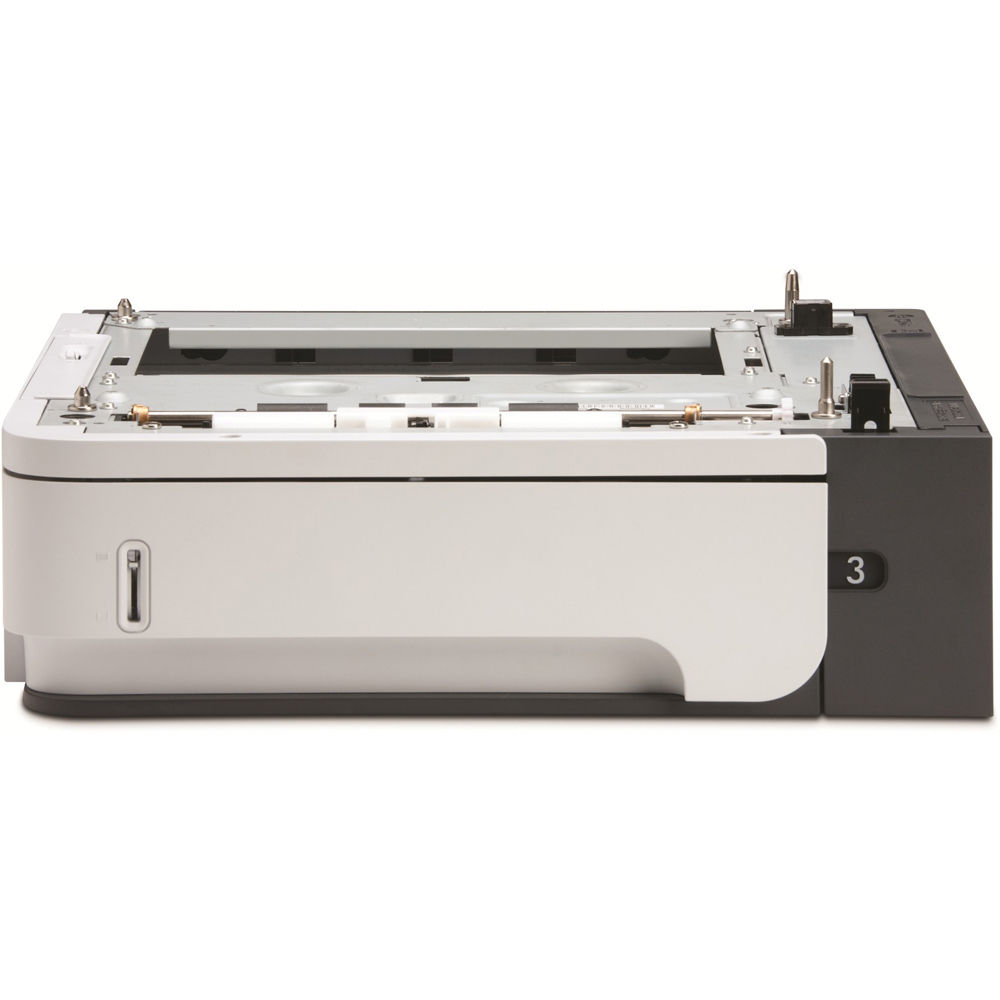
HP LaserJet P4014 P4015 P4515 500-Sheet Paper Feeder & Tray – CB518A / CB518-67901
NOT COMPATIBLE WITH HP M601, M602 OR M603 SERIES.
This CB518A / CB518-67901 feeder is for HP LaserJet P4014, P4015 and P4515 series printers only. Do not order it for an HP LaserJet Enterprise 600 M601, M602 or M603 printer, regardless of model suffix. Those series use the CE998A 500-sheet feeder accessory. See the excluded-model table below before purchasing.
HP LaserJet Paper Handling
More paper.
Fewer interruptions.
HP LaserJet P4014 / P4015 / P4515
500-Sheet Paper Feeder & Tray Assembly
Keep your work moving.
Expand your compatible HP LaserJet printer’s paper supply with the CB518A / CB518-67901 500-Sheet Feeder. This optional input assembly adds a dedicated paper source beneath the printer, allowing longer print runs between refills. Keep everyday paper in one tray and another supported size or stock in a separate tray for easier job changes.
Capacity that supports your workload.
Add up to 500 sheets to your existing input capacity. Ideal for shared offices, longer reports and routine document printing where frequent paper refills interrupt productivity. Actual capacity varies with paper thickness.
A separate source for the next job.
Load supported Letter, Legal, A4 or other compatible paper sizes in the additional tray. Configure the paper size and type at the printer, then select the appropriate source in your print settings.
Product details.
| Product type | Optional 500-sheet paper feeder and tray assembly |
|---|---|
| HP accessory number | CB518A |
| HP service part number | CB518-67901 |
| Input capacity | Up to 500 sheets per feeder; capacity depends on media thickness |
| Supported paper sizes | Letter, Legal, A4, A5, B5 (JIS), Executive and 8.5 × 13 inches |
| Installation location | Beneath the compatible printer, as an additional paper input source |
| Compatible printer families | HP LaserJet P4014, P4015 and P4515 |
| Quantity | One feeder assembly with its 500-sheet paper tray |
Compatible HP LaserJet models.
Designed for the P4014, P4015 and P4515 printer families. Documented configurations include the following:
| Printer family | Compatible models and product numbers |
|---|---|
| HP LaserJet P4014 | P4014 — CB506A P4014n — CB507A P4014dn — CB512A |
| HP LaserJet P4015 | P4015n — CB509A P4015dn — CB526A P4015tn — CB510A P4015x — CB511A |
| HP LaserJet P4515 | P4515n — CB514A P4515tn — CB515A P4515x — CB516A P4515xm — CB517A |
Excluded models — do not order for these printers.
Every HP LaserJet Enterprise 600 M601, M602 and M603 configuration is excluded from this listing. The table identifies the documented models and their printer product numbers. HP specifies the CE998A 500-sheet feeder for these families.
| NON-COMPATIBLE MODEL | PRINTER PRODUCT NUMBER |
|---|---|
| HP LaserJet Enterprise 600 M601n | CE989A / CE989AR |
| HP LaserJet Enterprise 600 M601dn | CE990A / CE990AR |
| HP LaserJet Enterprise 600 M601m | F3J55A |
| HP LaserJet Enterprise 600 M602n | CE991A / CE991AR |
| HP LaserJet Enterprise 600 M602dn | CE992A / CE992AR |
| HP LaserJet Enterprise 600 M602m | F3J54A |
| HP LaserJet Enterprise 600 M602x | CE993A / CE993AR |
| HP LaserJet Enterprise 600 M603n | CE994A / CE994AR |
| HP LaserJet Enterprise 600 M603dn | CE995A / CE995AR |
| HP LaserJet Enterprise 600 M603xh | CE996A / CE996AR |
Product numbers ending in “AR” identify HP refurbished configurations. Regional suffixes, such as “#BGJ,” do not change these exclusions. This table covers the excluded M601/M602/M603 families; it is not a universal list of every other printer. Compatibility is limited to the P4014/P4015/P4515 families identified above.
Installation and setup.
- Confirm the printer’s exact model and product number before installation.
- Turn off and unplug the printer. Follow HP’s installation instructions when positioning the printer on the feeder.
- Adjust the paper guides to the loaded size and keep the paper stack below the tray’s maximum-fill marks.
- Power on the printer and configure the additional tray’s paper size and type.
- Confirm that the feeder appears in the printer configuration and update the installed tray settings in the print driver if necessary.
When combining multiple paper-handling accessories, follow HP’s supported stacking configurations and printer-stand requirements.
Included
One CB518A / CB518-67901 500-sheet feeder assembly with paper tray.
Accessory listing
Printer, paper and additional paper-handling accessories are not included.
The right feeder starts with the right model.
CB518A / CB518-67901
HP LaserJet P4014 · P4015 · P4515
500-Sheet Paper Feeder & Tray Assembly
NOT FOR M601 · M602 · M603.
HP and LaserJet are trademarks of HP. Model names and product numbers identify compatibility. Paper capacity varies with media weight and thickness.
Couldn't load pickup availability
Pickup available at WAREHOUSE
Usually ready in 5+ daysPairs well with
In stock! Ships within 5-7 business days.
100% Tested prior to shipment
Warranty Included (1 Year, 2 Year, and 3 Year Extensions available on all Printers)
Lifetime technical support
HP LaserJet P4014 P4015 P4515 500-Sheet Paper Feeder & Tray – CB518A / CB518-67901
Please visit our FAQs page or email Sales@theprinterdepo.com with any questions you may have.
-
Shipping Information
Most orders ship within 48 hours of receipt.
-
Customer Support
Please reach out to us via email or chat box Monday-Friday 8AM-5PM CST.
-
FAQ’s
Please click "Quick Links" at the bottom of the page & open "FAQ's" for more information.
-
Technical Support
All of our products include lifetime technical support via email.
FAQs
Please read our FAQs page to find out more.
How much is shipping?
- Shipping is free on all items below 65lbs
- If you are purchasing in bulk & the total weight exceeds 65lbs then please reach out to us through the chat box or email sales@theprinterdepo.com for a custom quote.
- If the item exceeds 65lbs then you may be subject to freight charges.
Do you charge sales tax?
- We do not collect sales tax outside of the state of Texas. Therefore, you do not need to provide any proof of exemption unless your shipping/billing address is in Texas.
- If you are located in Texas & would like your account to be tax exempt then you must email Sales@theprinterdepo.com your Texas resale certificate or proof of exemption.
Do you offer "Blind Drop Shipping"?
- Yes, we offer "Blind Drop Shipping" & "Private labeling".
- Please email Sales@theprinterdepo.com for more details.
Do you offer any discounts?
- Yes, please sign up for our weekly newsletter for upcoming sales, discount codes, and product announcements.
- Wholesalers should email sales@theprinterdepo.com for a custom quote.
Do you accept "Purchase Orders"?
- Yes, please send your PO's to sales@theprinterdepo.com
- Credit card or Net 30 application must be on file in order for your purchase order to be processed.