
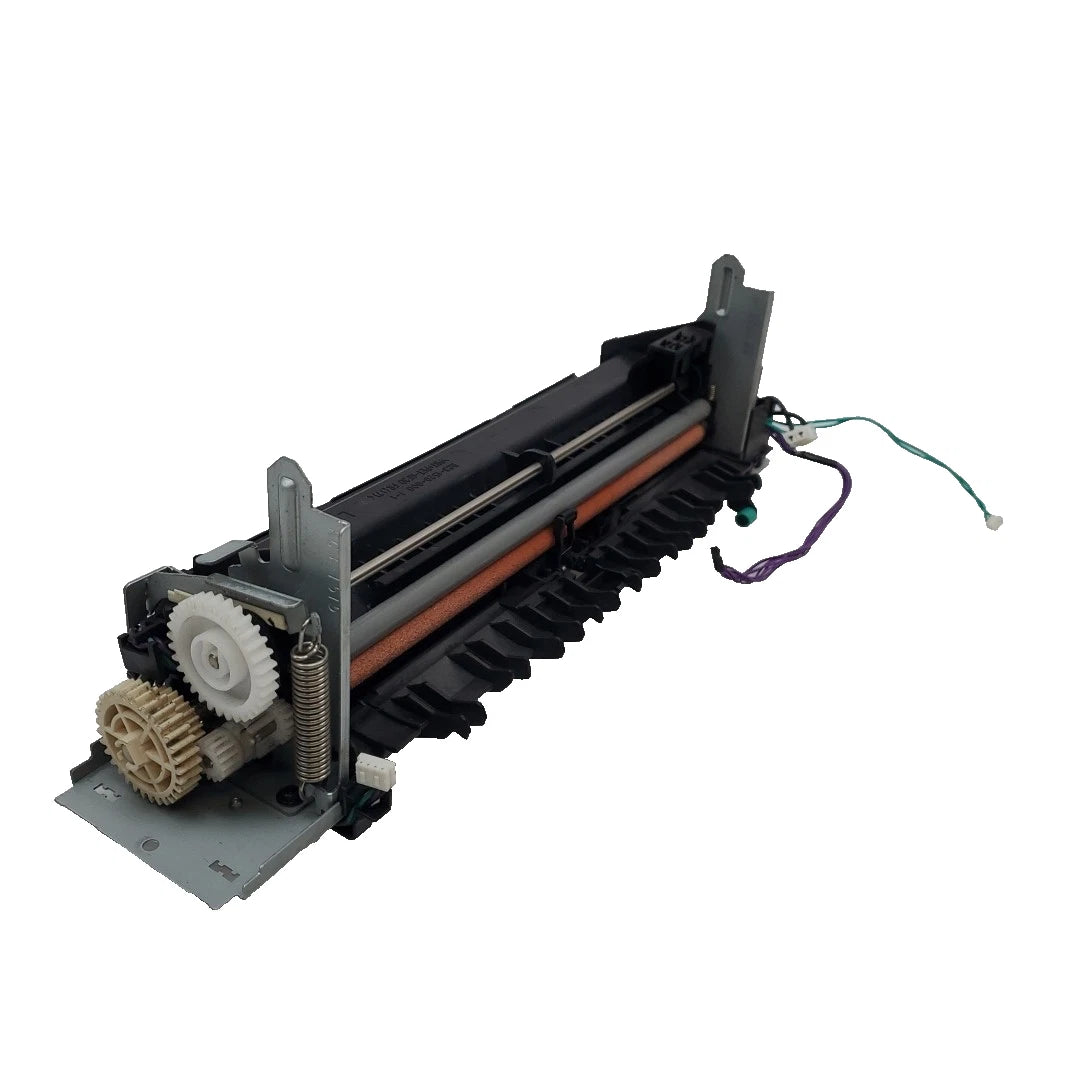
HP Color LaserJet Pro M451, M475, and M476 Fuser Assembly – RM1-8054 / RM2-5177 / RC4-2870
HP Color LaserJet Pro • Fuser Assembly
The finishing touch.
For every page.
Replacement Fuser Assembly • RC4-2870
Help restore properly bonded text and color graphics by replacing a worn or damaged fuser in your compatible HP Color LaserJet Pro.
Match the assembly number and voltage before ordering. RC4-2870 is the listing reference. Confirm the complete replacement assembly number and electrical rating with The Printer Depot. A matching appearance or RC4 reference alone does not confirm compatibility. The 110V and 220V versions are not interchangeable.
Make the print last.
The fuser applies heat and pressure to bond toner to paper. A correctly functioning assembly helps produce finished pages with securely fused text and graphics.
Address wear at the source.
Replacement may resolve toner rubbing off, recurring marks, wrinkling, or fuser-area jams when diagnosis identifies the fuser as the cause.
Model Reference
Find your HP Color LaserJet.
Use this application guide together with your printer’s full model number and the supplied fuser’s assembly label.
| Product family | Models | Fitment requirement |
|---|---|---|
| HP LaserJet Pro 400 color | M451dn M451dw M451nw |
Match the M451 assembly version and voltage. |
| HP LaserJet Pro 300 color MFP | M375nw | Match the M375/M475 assembly version and voltage. |
| HP LaserJet Pro 400 color MFP | M475dn M475dw |
Match the M375/M475 assembly version and voltage. |
| Additional HP application | HP LaserJet Pro 300 color M351a | Conditional: confirm the supplied assembly is approved for M351a. |
| Additional HP MFP applications | HP Color LaserJet Pro MFP M476dn HP Color LaserJet Pro MFP M476dw HP Color LaserJet Pro MFP M476nw |
Conditional: confirm an M476-compatible complete assembly. RC4-2870 alone does not establish fitment. |
Canon compatibility.
No Canon models have been verified for this complete fuser assembly. Shared components or similar-looking housings do not establish interchangeability. Contact The Printer Depot with your Canon model and full fuser part number before purchasing for a Canon device.
The right reference matters.
These are application references to help identify the correct version, not a claim that every number below is interchangeable or included.
| Application | 110V reference | 220V reference |
|---|---|---|
| M351 / M451 family | RM1-8054-000 RM2-5177-000CN |
RM1-8606-000 |
| M375 / M475 family | RM1-8061-000 RM2-5476-000CN |
RM1-8062-000 |
Install with the correct service procedure.
Turn off and unplug the printer, then allow the fuser to cool fully before servicing. Follow the service instructions for your exact model; access procedures differ between printers and multifunction devices. After installation, check paper feeding and print quality.
Support for the right fit.
Lifetime technical support via email is available from The Printer Depot. Provide your printer model, full fuser assembly number, and voltage when requesting compatibility assistance.
RC4-2870 • FUSER ASSEMBLY
Bring every page to a proper finish.
Confirm your HP model, complete assembly number, voltage, and supplied condition before shipment. Additional HP applications require version verification. Canon compatibility has not been established.
HP, Color LaserJet, LaserJet Pro, and Canon are trademarks of their respective owners. Names and part numbers are used for identification. Product condition, warranty terms, and any core-return requirement must match the selected offer.
Couldn't load pickup availability
Pickup available at WAREHOUSE
Usually ready in 5+ daysPairs well with
In stock! Ships within 5-7 business days.
100% Tested prior to shipment
Warranty Included (1 Year, 2 Year, and 3 Year Extensions available on all Printers)
Lifetime technical support
HP Color LaserJet Pro M451, M475, and M476 Fuser Assembly – RM1-8054 / RM2-5177 / RC4-2870
Please visit our FAQs page or email Sales@theprinterdepo.com with any questions you may have.
-
Shipping Information
Most orders ship within 48 hours of receipt.
-
Customer Support
Please reach out to us via email or chat box Monday-Friday 8AM-5PM CST.
-
FAQ’s
Please click "Quick Links" at the bottom of the page & open "FAQ's" for more information.
-
Technical Support
All of our products include lifetime technical support via email.
FAQs
Please read our FAQs page to find out more.
How much is shipping?
- Shipping is free on all items below 65lbs
- If you are purchasing in bulk & the total weight exceeds 65lbs then please reach out to us through the chat box or email sales@theprinterdepo.com for a custom quote.
- If the item exceeds 65lbs then you may be subject to freight charges.
Do you charge sales tax?
- We do not collect sales tax outside of the state of Texas. Therefore, you do not need to provide any proof of exemption unless your shipping/billing address is in Texas.
- If you are located in Texas & would like your account to be tax exempt then you must email Sales@theprinterdepo.com your Texas resale certificate or proof of exemption.
Do you offer "Blind Drop Shipping"?
- Yes, we offer "Blind Drop Shipping" & "Private labeling".
- Please email Sales@theprinterdepo.com for more details.
Do you offer any discounts?
- Yes, please sign up for our weekly newsletter for upcoming sales, discount codes, and product announcements.
- Wholesalers should email sales@theprinterdepo.com for a custom quote.
Do you accept "Purchase Orders"?
- Yes, please send your PO's to sales@theprinterdepo.com
- Credit card or Net 30 application must be on file in order for your purchase order to be processed.