
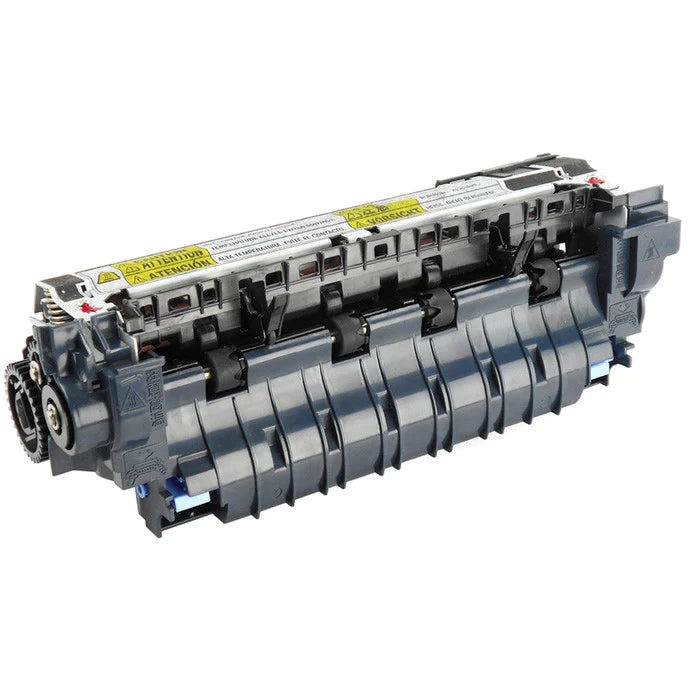
HP LaserJet Enterprise 600 M601 M602 M603 110V Fuser Assembly On Exchange RM1-8395 CE988-67901
The final stage of every printed page.
The fusing assembly applies precisely controlled heat and pressure to permanently bond toner to the paper. As the original fuser wears, the printer may begin displaying fuser-related errors, experiencing rear-paper-path jams or producing pages with loose toner, wrinkles, ghosting or inconsistent toner adhesion.
Replacing the fuser can restore proper toner bonding and dependable paper movement through the final stage of the print path. This listing supplies the fusing assembly only under an exchange program; it is not a complete preventive-maintenance kit.
Reliable toner adhesion
Restores the controlled combination of heat and pressure needed to permanently fuse black toner onto supported print media.
Direct-fit service assembly
Installs through the printer’s rear paper path and uses the existing blue release and locking tabs. HP identifies the replacement as a basic service procedure requiring no special tools.
Built for Enterprise 600 printers
Compatible with the complete 110-volt M601, M602 and M603 configuration range, including network, duplex and high-capacity models.
Cost-saving exchange program
The exchange format reduces the purchase price by requiring the original defective fuser to be returned using the prepaid label supplied with the replacement.
Compatible printer configurations
| Printer Model | Printer Product Number | Configuration |
|---|---|---|
| HP LaserJet Enterprise 600 M601n | CE989A | Network |
| HP LaserJet Enterprise 600 M601dn | CE990A | Duplex and network |
| HP LaserJet Enterprise 600 M602n | CE991A | Network |
| HP LaserJet Enterprise 600 M602dn | CE992A | Duplex and network |
| HP LaserJet Enterprise 600 M602x | CE993A | Duplex, network and additional feeder |
| HP LaserJet Enterprise 600 M603n | CE994A | Network |
| HP LaserJet Enterprise 600 M603dn | CE995A | Duplex and network |
| HP LaserJet Enterprise 600 M603xh | CE996A | Duplex, network, additional feeder and storage |
Part-number cross references
| Part Number | Description |
|---|---|
| CE988-67901 | HP 110V fuser service-kit reference |
| CE988-67914 | Current HP 110V replacement-fuser kit reference |
| RM1-8395 | Abbreviated 110V fusing-assembly number |
| RM1-8395-000CN | Complete HP service-assembly number |
| RM1-8395-270CN | Alternate or earlier revision of the 110V assembly |
Fuser assembly—not the complete CF064A maintenance kit
CF064A and CF064-67901 identify a larger 110-volt preventive-maintenance kit that normally includes an RM1-8395 fuser plus transfer and paper-feed rollers. Those maintenance-kit components are related to this printer family, but they are not included with this fuser-only listing unless expressly pictured or stated elsewhere in the offer.
Common reasons for replacement
These symptoms can have more than one cause. Confirm the diagnosis and exact error code before ordering replacement parts.
Product details
| Brand Compatibility | HP |
| Product Type | Fusing assembly |
| Purchase Format | Exchange—defective core return required |
| Primary Part Numbers | CE988-67901, RM1-8395, RM1-8395-000CN |
| Voltage | 110–127 VAC |
| Print Technology | Monochrome laser |
| Installed Location | Rear paper path behind the rear output bin |
| Installation Level | Basic replacement; no special tools normally required |
| Core-Return Label | Prepaid return label included |
| Non-Return Charge | $60 if the defective fuser is not returned |
A straightforward rear-access replacement.
- Turn the printer off and allow it to complete its shutdown.
- Wait approximately 30 seconds, disconnect the power cord and allow the fuser to cool for at least five minutes.
- Remove the duplex accessory or duplex cover when present.
- Open and remove the rear output bin to expose the fusing assembly.
- Squeeze the two blue fuser-release tabs and pull the old fuser straight out of the printer.
- Slide the replacement fuser straight into position until both blue locking tabs engage.
- Reinstall the rear output bin and duplex components.
- Reconnect power, turn on the printer and print a configuration or test page.
- Place the removed defective fuser into the replacement packaging and return it using the supplied prepaid label.
- One 110V HP M601/M602/M603 fusing assembly
- Protective shipping packaging
- Prepaid label for returning the defective fuser core
- Printer, toner cartridge or paper
- Transfer roller
- Tray pickup, feed or separation rollers
- Complete CF064A preventive-maintenance kit
How the exchange program works
HP M601/M602/M603 110V fuser sold on exchange.
This listing is for one 110-volt fusing assembly identified by CE988-67901 and RM1-8395. It is not a complete maintenance kit. The defective fuser core must be returned using the supplied prepaid label. Failure to return the core will result in a $60 charge, which may be referred for collection if left unpaid.
Couldn't load pickup availability
Pickup available at WAREHOUSE
Usually ready in 5+ daysPairs well with
In stock! Ships within 5-7 business days.
100% Tested prior to shipment
Warranty Included (1 Year, 2 Year, and 3 Year Extensions available on all Printers)
Lifetime technical support
HP LaserJet Enterprise 600 M601 M602 M603 110V Fuser Assembly On Exchange RM1-8395 CE988-67901
Please visit our FAQs page or email Sales@theprinterdepo.com with any questions you may have.
-
Shipping Information
Most orders ship within 48 hours of receipt.
-
Customer Support
Please reach out to us via email or chat box Monday-Friday 8AM-5PM CST.
-
FAQ’s
Please click "Quick Links" at the bottom of the page & open "FAQ's" for more information.
-
Technical Support
All of our products include lifetime technical support via email.
FAQs
Please read our FAQs page to find out more.
How much is shipping?
- Shipping is free on all items below 65lbs
- If you are purchasing in bulk & the total weight exceeds 65lbs then please reach out to us through the chat box or email sales@theprinterdepo.com for a custom quote.
- If the item exceeds 65lbs then you may be subject to freight charges.
Do you charge sales tax?
- We do not collect sales tax outside of the state of Texas. Therefore, you do not need to provide any proof of exemption unless your shipping/billing address is in Texas.
- If you are located in Texas & would like your account to be tax exempt then you must email Sales@theprinterdepo.com your Texas resale certificate or proof of exemption.
Do you offer "Blind Drop Shipping"?
- Yes, we offer "Blind Drop Shipping" & "Private labeling".
- Please email Sales@theprinterdepo.com for more details.
Do you offer any discounts?
- Yes, please sign up for our weekly newsletter for upcoming sales, discount codes, and product announcements.
- Wholesalers should email sales@theprinterdepo.com for a custom quote.
Do you accept "Purchase Orders"?
- Yes, please send your PO's to sales@theprinterdepo.com
- Credit card or Net 30 application must be on file in order for your purchase order to be processed.