
Professionally rebuilt
Carefully inspected, cleaned, rebuilt, and tested for dependable operation in compatible high-volume LaserJet printers.
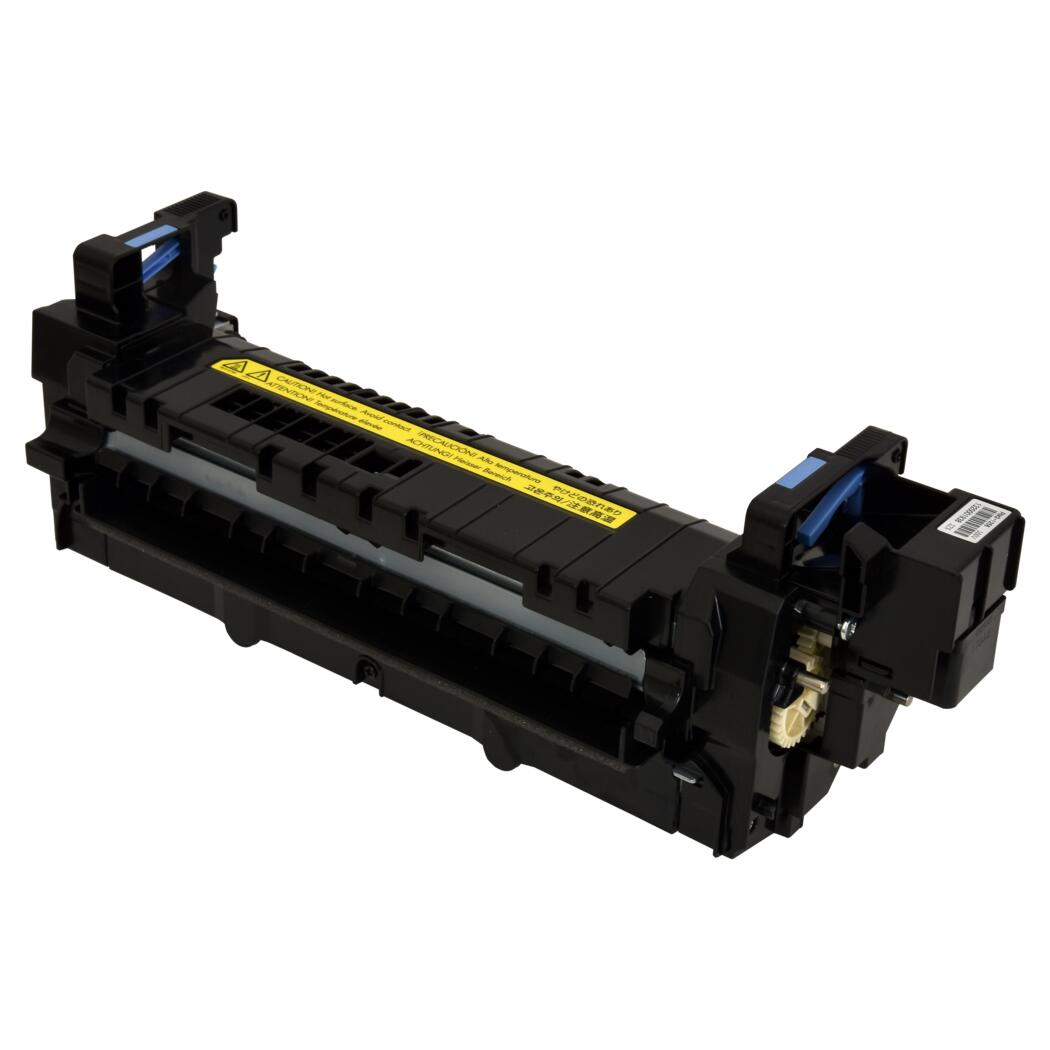
Restore sharp, consistent output and extend the working life of your HP LaserJet Enterprise printer with a professionally remanufactured fuser assembly.
Each fuser is inspected, rebuilt, cleaned, and performance-tested before shipment, providing a cost-effective alternative to purchasing a new assembly or replacing an otherwise dependable printer.
Carefully inspected, cleaned, rebuilt, and tested for dependable operation in compatible high-volume LaserJet printers.
Restores the controlled heat and pressure needed to bond toner securely and evenly to the page.
Helps extend the service life of existing equipment while supporting component reuse and reducing premature printer replacement.
A complete 110–120V fuser/fixing assembly corresponding to RM2-1256 and RM2-6778 for the compatible printer models listed below.
This listing does not include toner, transfer rollers, pickup rollers, installation tools, or a complete maintenance kit unless specifically shown elsewhere in the listing.
Confirm your complete printer model, existing part number, and voltage before ordering.
M607 Series
M608 Series
M609 Series
M610 Series
M611 Series
M612 Series
M631 Series
M632 Series
M633 Series
M634 Series
M635 Series
M636 Series
A failing fuser can affect both print quality and paper movement. Replacing it may help resolve the following symptoms.
Toner rubs or flakes off the page after printing.
Printed content appears smeared, duplicated, or repeatedly marked.
Paper exits the printer with creases, wrinkles, or curled areas.
Black text or graphics appear inconsistent across the page.
Paper frequently stops near the rear output or fuser area.
The printer displays a replacement notice or a relevant 50.x fuser-related error.
The fuser can become extremely hot during printer operation. Turn the printer off, wait before disconnecting power, unplug the power cable, and allow the installed fuser to cool completely before removal.
Never attempt to remove or handle a hot fuser assembly.
Confirm the printer model, fuser part number, and 110–120V requirement.
Turn off and unplug the printer, then allow the existing fuser to cool.
Remove the worn assembly and install the replacement according to the printer service procedure.
Reconnect power and print a test page to confirm operation and print quality.
Before checkout, confirm that your printer uses RM2-1256 or RM2-6778 and requires a 110–120V fuser assembly.
*Estimated yield is not a guarantee. Actual service life varies according to print volume, paper type, job size, printer condition, environment, and other operating factors. Product names and part numbers are used solely to identify compatibility. HP and LaserJet are trademarks of HP Inc.
Couldn't load pickup availability
Pickup available at WAREHOUSE
Usually ready in 5+ daysPairs well with
In stock! Ships within 5-7 business days.
100% Tested prior to shipment
Warranty Included (1 Year, 2 Year, and 3 Year Extensions available on all Printers)
Lifetime technical support
HP LaserJet Enterprise M607 M608 M609 M610 M611 M612 M631 M632 M633 M634 M635 M636 Remanufactured Fuser RM2-6778 RM2-1256
Please visit our FAQs page or email Sales@theprinterdepo.com with any questions you may have.
Shipping Information
Most orders ship within 48 hours of receipt.
Customer Support
Please reach out to us via email or chat box Monday-Friday 8AM-5PM CST.
FAQ’s
Please click "Quick Links" at the bottom of the page & open "FAQ's" for more information.
Technical Support
All of our products include lifetime technical support via email.
Please read our FAQs page to find out more.