
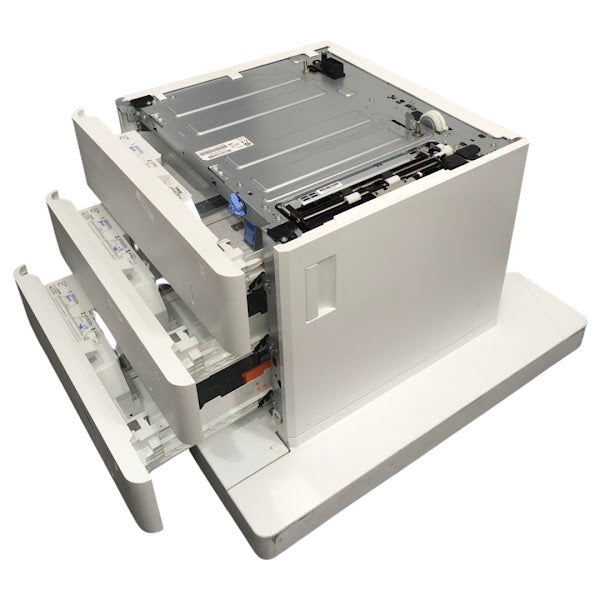
HP LaserJet Enterprise M631–M637 & Managed E625/E626 3x550-Sheet Paper Feeder Cabinet – J8J93A
Important freight shipping notice
Freight shipping is strictly for commercial customers with loading dock/forklift. Resident areas and customers that require a lift gate will be required to pay an additional $80 lift-gate, & $95 residential delivery before shipping.
Please confirm your exact printer model and delivery requirements before shipment.
HP LaserJet paper handling • J8J93A
More paper.
Fewer interruptions.
HP J8J93A 3x550-Sheet Paper Feeder with Cabinet
Give your compatible HP LaserJet Enterprise or Managed MFP room to keep working. Three dedicated paper drawers provide up to 1,650 sheets of additional input capacity, while the integrated wheeled cabinet creates a convenient floor-standing print station.
3
Separate paper drawers
550
Sheets per drawer, maximum
1,650
Sheets in this accessory
2
Condition options
Choose the condition that fits your purchase.
Both variants are offered under accessory part number J8J93A and have the same specified paper capacity and model compatibility. The condition you select determines the item supplied and the applicable listing price.
Remanufactured
A previously used feeder/cabinet that has been remanufactured for continued service. Choose this option when you prefer a remanufactured unit for your existing printer. Cosmetic signs of previous use may be present.
New Open Box
A new feeder/cabinet offered with opened packaging. Choose this option when you prefer new open-box stock. Packaging may show handling or storage wear; this condition does not mean a factory-sealed carton.
Built around the way your office prints.
Keep longer jobs moving.
Extra input capacity reduces the need to pause busy print runs for paper refills. Keep everyday documents, reports, invoices, and shared workgroup jobs supplied with paper throughout the day.
Keep different paper ready.
Use separate drawers for supported paper sizes or stocks, such as Letter, Legal, A4, or letterhead. Configure each tray's size and type so print jobs can draw from the intended paper source.
Create a dedicated print station.
The integrated cabinet and wheeled base support an approved floor-standing printer configuration, freeing desk or table space and making access around the print station more convenient.
Expand or replace, as needed.
Add a three-drawer base to an eligible printer, or replace an existing J8J93A assembly. Check the printer's current lower-feeder arrangement first, especially when it already has a cabinet or high-capacity base.
Understand the capacity.
The J8J93A holds up to 1,650 sheets across three 550-sheet drawers. On a compatible base printer with a 100-sheet multipurpose tray and a 550-sheet main tray, installing this accessory produces a typical total input capacity of 2,300 sheets.
100-sheet multipurpose tray + 550-sheet main tray + 1,650-sheet cabinet = 2,300 sheets
This example assumes the cabinet is being added to the base configuration. Replacing an existing feeder does not add its old capacity again. Ratings are based on standard plain paper; heavier or specialty media can reduce the number of sheets that fit.
HP LaserJet Enterprise compatibility.
Match the full printer model and product number below. The product numbers in these tables identify the printers; the feeder/cabinet being purchased is J8J93A.
| Compatible printer model | Printer product number |
|---|---|
| HP LaserJet Enterprise MFP M631dn | J8J63A |
| HP LaserJet Enterprise Flow MFP M631h | J8J64A |
| HP LaserJet Enterprise MFP M631z | J8J65A |
| HP LaserJet Enterprise MFP M632h | J8J70A |
| HP LaserJet Enterprise MFP M633fh | J8J76A |
| HP LaserJet Enterprise MFP M634dn | 7PS94A |
| HP LaserJet Enterprise Flow MFP M634h | 7PS95A |
| HP LaserJet Enterprise MFP M634z | 7PS96A |
| HP LaserJet Enterprise MFP M635h | 7PS97A |
| HP LaserJet Enterprise MFP M635fht | 7PS98A |
| HP LaserJet Enterprise Flow MFP M635z | 7PS99A |
| HP LaserJet Enterprise MFP M636fh | 7PT00A |
| HP LaserJet Enterprise Flow MFP M636z | 7PT01A |
| HP LaserJet Enterprise MFP M637 | 27C07AV |
| HP LaserJet Enterprise MFP M637 65ppm | 2S1H8AV |
| HP LaserJet Enterprise MFP M637 75ppm | 2S1H9AV |
M637 entries include the configurable platform and its separately identified 65ppm and 75ppm versions. Existing paper-feeder equipment must still be checked before installation.
HP LaserJet Managed compatibility.
Supported Managed models include the following E625 and E626 configurations, including the listed Flow versions.
| Compatible printer model | Printer product number |
|---|---|
| HP LaserJet Managed MFP E62555dn | J8J66A |
| HP LaserJet Managed MFP E62565hs | J8J73A |
| HP LaserJet Managed Flow MFP E62565h | J8J74A |
| HP LaserJet Managed Flow MFP E62565z | J8J79A |
| HP LaserJet Managed Flow MFP E62575z | J8J80A |
| HP LaserJet Managed MFP E62655dn | 3GY14A |
| HP LaserJet Managed MFP E62665hs | 3GY15A |
| HP LaserJet Managed Flow MFP E62665h | 3GY16A |
| HP LaserJet Managed Flow MFP E62665z | 3GY17A |
| HP LaserJet Managed Flow MFP E62675z | 3GY18A |
Check the complete configuration before ordering.
The M631z and M634z were supplied with a 3x550-sheet base in their standard configurations. For these printers, this accessory can serve as a replacement for that base. Other listed printers may already have a different floor-standing feeder that must be removed as part of an approved reconfiguration.
J8J93A cannot be stacked with another feeder/stand base such as J8J91A or J8J92A. Any additional tray must comply with the printer's permitted accessory combination and total tray limit.
M632fht (J8J71A), Flow M632z (J8J72A), and Flow M633z (J8J78A): HP does not list J8J93A as an available upgrade for these factory configurations. Contact The Printer Depot before ordering for one of these models. A shared M631/M632/M633 family name alone does not establish compatibility.
Specifications at a glance.
| Manufacturer / part number | HP / J8J93A |
|---|---|
| Accessory type | 3x550-sheet paper feeder with cabinet and wheeled floor base |
| Paper drawers / capacity | 3 drawers; up to 550 sheets each; 1,650 sheets combined |
| Condition variants | Remanufactured or New Open Box; select before purchase |
| Custom media size range | 3.90 × 5.83 to 8.5 × 14 in 99 × 148 to 216 × 356 mm |
| Common paper sizes | Letter, Legal, and A4, plus other printer-supported sizes within the stated range |
| Media weight range | 60–120 g/m² / 16–32 lb |
| Paper stock examples | Plain, bond, recycled, preprinted, prepunched, colored paper, and letterhead within the printer's supported tray and media limits |
| Accessory dimensions (W × D × H) |
26 × 26.2 × 18.8 in 661 × 667 × 479 mm |
| Accessory weight | Approximately 50 lb / 22.7 kg |
| Installation position | Beneath the compatible printer as part of an approved feeder/stand configuration |
| Quantity supplied | One J8J93A feeder/cabinet assembly in the selected condition |
Dimensions and weight apply to the accessory alone. Allow additional space for the printer, open drawers, access doors, and servicing. Media must meet both the feeder specifications and the printer's instructions for the selected tray.
What's included.
- One HP J8J93A feeder/cabinet assembly.
- Three integrated 550-sheet paper drawers.
- The assembly's cabinet and wheeled base.
- Your selected condition: Remanufactured or New Open Box.
Printer, toner, paper, and separately sold feeder or finishing accessories are not included.
Prepare for installation.
- Confirm the full printer model, product number, and existing feeder arrangement.
- Follow HP's installation instructions for positioning, lifting, and securing the printer and cabinet.
- Adjust the paper guides and load each drawer below its maximum fill line.
- Set each tray's paper size and type at the printer.
- Confirm the added trays appear in the printer driver and verify feeding from each drawer.
HP J8J93A
More capacity for the work ahead.
Equip your compatible HP Enterprise or Managed MFP with three dedicated paper drawers and a wheeled cabinet. Select Remanufactured or New Open Box, match your exact printer configuration, and confirm freight requirements before shipment.
Couldn't load pickup availability
Pickup available at WAREHOUSE
Usually ready in 5+ daysPairs well with
In stock! Ships within 5-7 business days.
100% Tested prior to shipment
Warranty Included (1 Year, 2 Year, and 3 Year Extensions available on all Printers)
Lifetime technical support
HP LaserJet Enterprise M631–M637 & Managed E625/E626 3x550-Sheet Paper Feeder Cabinet – J8J93A
Please visit our FAQs page or email Sales@theprinterdepo.com with any questions you may have.
-
Shipping Information
Most orders ship within 48 hours of receipt.
-
Customer Support
Please reach out to us via email or chat box Monday-Friday 8AM-5PM CST.
-
FAQ’s
Please click "Quick Links" at the bottom of the page & open "FAQ's" for more information.
-
Technical Support
All of our products include lifetime technical support via email.
FAQs
Please read our FAQs page to find out more.
How much is shipping?
- Shipping is free on all items below 65lbs
- If you are purchasing in bulk & the total weight exceeds 65lbs then please reach out to us through the chat box or email sales@theprinterdepo.com for a custom quote.
- If the item exceeds 65lbs then you may be subject to freight charges.
Do you charge sales tax?
- We do not collect sales tax outside of the state of Texas. Therefore, you do not need to provide any proof of exemption unless your shipping/billing address is in Texas.
- If you are located in Texas & would like your account to be tax exempt then you must email Sales@theprinterdepo.com your Texas resale certificate or proof of exemption.
Do you offer "Blind Drop Shipping"?
- Yes, we offer "Blind Drop Shipping" & "Private labeling".
- Please email Sales@theprinterdepo.com for more details.
Do you offer any discounts?
- Yes, please sign up for our weekly newsletter for upcoming sales, discount codes, and product announcements.
- Wholesalers should email sales@theprinterdepo.com for a custom quote.
Do you accept "Purchase Orders"?
- Yes, please send your PO's to sales@theprinterdepo.com
- Credit card or Net 30 application must be on file in order for your purchase order to be processed.