
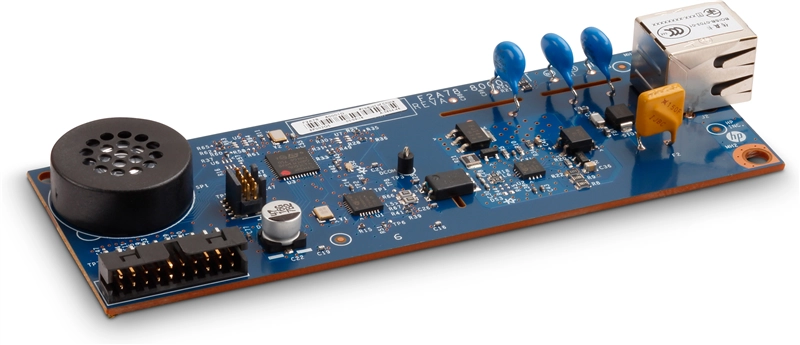
HP LaserJet Enterprise & Managed M776 E77422 E77428 E52645 Analog Fax Accessory 700 – 2EH31A
HP MFP ANALOG FAX ACCESSORY 700
Fax capability.
Built into your workflow.
Add supported analog fax functionality—or replace an existing compatible fax module—with the HP 2EH31A. Integrate fax sending and receiving into your HP multifunction printer.
The 2EH31A is a fax accessory for supported HP multifunction printers, including the M776, E77422, E77428 and E52645 families. Compatibility depends on the exact printer, firmware, country configuration and installation hardware. A replacement board alone may not contain the cradle, bracket or adapter cable required for a first-time installation or an upgrade from an older fax accessory.
Maximum modem speed
Analog fax capability
Telephone connection
HP fax accessory series
One printer. More ways to work.
Keep fax communication at the same device your team uses for everyday document handling. The HP Analog Fax Accessory 700 connects supported multifunction printers to an analog telephone service for sending scanned documents and receiving incoming faxes.
Familiar controls.
Use the supported MFP's fax interface to select recipients and send documents from its scanner or automatic document feeder. Address-book entries and speed dials can simplify repeat destinations where supported.
Control incoming documents.
Supported host features can include receive stamping, blocked fax numbers, rings-to-answer settings and controlled fax printing. PIN protection and printing schedules depend on the printer and firmware.
Manage the workflow.
Configure available fax settings through the printer's control panel or Embedded Web Server. Supported systems may offer billing codes, activity reporting, fax archiving and forwarding options.
Fit the right repair or upgrade.
Use the accessory to enable fax on a supported optional-fax configuration or replace a compatible installed fax accessory. Printers supplied with fax may already contain a module; replacement does not automatically add a second fax line.
Feature availability, scan handling, fax storage and administrative options are determined by the host MFP, firmware and configured software. The accessory does not add Flow scanning features to a non-Flow printer.
Compatibility. By model.
The following tables identify supported printer families and their listed model configurations. They are subject to the installation requirements above. A family match does not establish that a bare board is a complete installation kit. Verify the printer's full product number, current fax assembly and country requirements before purchase.
Some models include fax as standard and others support it as an option. “Flow” identifies the Flow configuration. Regional and bundled product numbers can differ even when the model name is the same.
HP LaserJet Enterprise
| HP printer family | Model configurations |
|---|---|
| LaserJet Enterprise MFP M528 | M528dn; M528f; Flow M528c; Flow M528z |
| LaserJet Enterprise MFP M634 | M634dn; Flow M634h; Flow M634z |
| LaserJet Enterprise MFP M635 | M635h; M635fht; Flow M635z |
| LaserJet Enterprise MFP M636 | M636fh; Flow M636z |
| Color LaserJet Enterprise MFP M776 | M776dn; Flow M776z; Flow M776zs |
HP LaserJet Managed
| HP printer family | Model configurations |
|---|---|
| LaserJet Managed MFP E52645 | E52645dn; Flow E52645c |
| LaserJet Managed MFP E62655 | E62655dn |
| LaserJet Managed MFP E62665 | E62665hs; Flow E62665h; Flow E62665z |
| LaserJet Managed MFP E62675 | Flow E62675z |
| LaserJet Managed MFP E72425 | E72425dv; E72425dn; E72425dn+ |
| LaserJet Managed MFP E72430 | E72430dn; E72430dn+ |
| Color LaserJet Managed MFP E67650 | E67650dh |
| Color LaserJet Managed MFP E67660 | Flow E67660z |
| Color LaserJet Managed MFP E77422 | E77422a; E77422dv; E77422dn; E77422dn+ |
| Color LaserJet Managed MFP E77428 | E77428dn; E77428dn+ |
| Color LaserJet Managed MFP E78223 | E78223a; E78223dv; E78223dn |
| Color LaserJet Managed MFP E78228 | E78228dn |
| Color LaserJet Managed MFP E78323 | E78323dn; Flow E78323z |
| Color LaserJet Managed MFP E78325 | E78325dn; Flow E78325z |
| Color LaserJet Managed MFP E78330 | E78330dn; Flow E78330z |
Additional Enterprise & Managed platforms
HP's accessory portfolio also lists the following families for the 700 accessory alongside the older Analog Fax Accessory 500. For these platforms, verify the complete installation arrangement before ordering. Moving from a 500 to a 700 can require the appropriate cradle/cable adapter and supported firmware.
| HP printer family | Model configurations — installation verification required |
|---|---|
| LaserJet Enterprise MFP M725 | M725dn; M725f; M725z; M725z+ |
| Color LaserJet Enterprise MFP M681 | M681dh; M681f; Flow M681f; Flow M681z |
| Color LaserJet Enterprise Flow MFP M880 | M880z; M880z+ |
| LaserJet Managed MFP E62555 | E62555dn |
| LaserJet Managed MFP E62565 | E62565hs; Flow E62565h; Flow E62565z |
| LaserJet Managed MFP E62575 | Flow E62575z |
| Color LaserJet Managed MFP E67550 | E67550dh |
| Color LaserJet Managed MFP E67560 | Flow E67560z |
| LaserJet Managed MFP E72525 | E72525dn; Flow E72525z |
| LaserJet Managed MFP E72530 | E72530dn; Flow E72530z |
| LaserJet Managed MFP E72535 | E72535dn; Flow E72535z |
| LaserJet Managed MFP E82540 | E82540dn; Flow E82540z |
| LaserJet Managed MFP E82550 | E82550dn; Flow E82550z |
| LaserJet Managed MFP E82560 | E82560dn; Flow E82560z |
| Color LaserJet Managed MFP E77822 | E77822dn; Flow E77822z |
| Color LaserJet Managed MFP E77825 | E77825dn; Flow E77825z |
| Color LaserJet Managed MFP E77830 | E77830dn; Flow E77830z |
| Color LaserJet Managed MFP E87640 | E87640dn; Flow E87640z |
| Color LaserJet Managed MFP E87650 | E87650dn; Flow E87650z |
| Color LaserJet Managed MFP E87660 | E87660dn; Flow E87660z |
HP PageWide Enterprise & Managed
HP also lists the 2EH31A for these PageWide MFP families. The same requirements for model, firmware, country and mounting hardware apply.
| HP printer family | Model configurations |
|---|---|
| PageWide Enterprise Color MFP 780 | 780dn; 780dns |
| PageWide Enterprise Color Flow MFP 785 | 785f; 785zs; 785z+ |
| PageWide Managed Color MFP E77650 | E77650dn; E77650dns; Flow E77650z; Flow E77650zs; Flow E77650z+ |
| PageWide Managed Color MFP E77660 | E77660dn; E77660dns; Flow E77660z; Flow E77660zs; Flow E77660z+ |
| PageWide Managed Color MFP P77440 | P77440dn |
| PageWide Managed Color MFP P77940 | P77940dn; P77940dns; P77940dn+ |
| PageWide Managed Color MFP P77950 | P77950dn; P77950dns; P77950dn+ |
| PageWide Managed Color MFP P77960 | P77960dn; P77960dns; P77960dn+ |
Compatibility limits that matter
- Match the accessory number: 2EH31A identifies the Analog Fax Accessory 700. Analog Fax Accessory 500 (CC487A), 600 (B5L53A) and 701 (5UT59A) are separate accessories; do not assume universal interchangeability.
- Check regional requirements: HP distinguishes 700 and 701 accessories by country availability. A printer-family match alone does not establish approval for every country.
- Do not infer compatibility from similar names: M527/E52545 and M577/E57540 are associated with the 600 accessory in HP's portfolio and are not included in this 2EH31A compatibility list.
- Other or unlisted models: Confirm the exact accessory against HP documentation for the printer's product number. This listing does not certify every regional configuration or unlisted printer.
- Multifunction printers only: The module does not give a print-only printer a scanner or standalone fax capability.
Technical details.
| Specification | Details |
|---|---|
| Manufacturer / product | HP MFP Analog Fax Accessory 700 |
| Accessory product number | 2EH31A |
| Product type | Internal analog fax accessory for supported HP multifunction printers |
| Primary function | Send and receive faxes through the host MFP using a compatible analog telephone connection |
| Maximum modem speed | Up to 33.6 kbps; actual connection speed depends on the telephone line and receiving fax device |
| Fax standard | ITU-T / CCITT Group 3 |
| Compression formats | MH, MR, MMR and JBIG |
| Telephone interface | RJ-11 analog telephone connection |
| Printer connection | Internal formatter connection; mounting arrangement varies by printer platform |
| Error correction | Error Correction Mode (ECM), subject to configuration and the receiving device |
| Management | Supported printer control panel and HP Embedded Web Server; fleet administration options depend on printer and software support |
| Firmware | Compatible HP FutureSmart firmware required; use the latest version supported for the specific printer |
| Memory, address book and resolution | Determined by the host printer and firmware; this accessory does not provide a universal page-memory or speed-dial capacity |
| Published accessory dimensions | 121 × 41.4 × 16.5 mm / 4.76 × 1.63 × 0.65 in; excludes shipping packaging |
| Published accessory weight | Approximately 26.6 g / 0.94 oz; excludes shipping packaging |
Installation essentials.
- Identify the printer. Record its full model and product number. Confirm whether the job is a first-time fax installation or replacement of an existing module.
- Check the kit and firmware. Verify the required cradle, support bracket and internal cable or adapter. Update to compatible HP firmware when required.
- Follow the model-specific installation guide. Shut down and disconnect the printer as instructed by HP. Observe electrostatic-discharge precautions when handling the formatter and fax board.
- Connect compatible telephone service. Use the required telephone cable and an analog line or a properly configured, fax-compatible analog port.
- Complete fax setup. Configure the country/region, date and time, fax number, company header and dialing settings. Adjust receive settings to suit the telephone service.
- Test both directions. Send a test fax, receive a test fax and review the printer's fax status or activity report.
This is not an Ethernet fax server, cloud-fax subscription or standalone USB fax modem. VoIP, digital PBX and other telephone systems require a suitable analog interface and service settings that support fax. Actual connection reliability and speed depend on the telephone service and the receiving device.
Accessory scope & package contents
This listing is for the HP Analog Fax Accessory 700, product number 2EH31A. Consult the listing's photographs and package-content details for the hardware supplied. Do not assume that a replacement module includes all components of HP's original boxed accessory kit, such as a cradle, adapter cable, telephone cable, PCB support or installation materials.
The printer and telephone service are separate requirements. Use the condition and warranty terms stated elsewhere in this listing.
HP Analog Fax Accessory 700 · 2EH31A
An internal fax solution for supported HP Enterprise and Managed MFPs.
Confirm the exact printer, regional requirements and installation hardware before ordering.
HP, LaserJet, PageWide and FutureSmart are trademarks of HP. Model availability, accessory support and fax features vary by configuration, country and firmware. Printer model names identify compatibility and do not indicate that a printer is included.
Couldn't load pickup availability
Pickup available at WAREHOUSE
Usually ready in 5+ daysPairs well with
In stock! Ships within 5-7 business days.
100% Tested prior to shipment
Warranty Included (1 Year, 2 Year, and 3 Year Extensions available on all Printers)
Lifetime technical support
HP LaserJet Enterprise & Managed M776 E77422 E77428 E52645 Analog Fax Accessory 700 – 2EH31A
Please visit our FAQs page or email Sales@theprinterdepo.com with any questions you may have.
-
Shipping Information
Most orders ship within 48 hours of receipt.
-
Customer Support
Please reach out to us via email or chat box Monday-Friday 8AM-5PM CST.
-
FAQ’s
Please click "Quick Links" at the bottom of the page & open "FAQ's" for more information.
-
Technical Support
All of our products include lifetime technical support via email.
FAQs
Please read our FAQs page to find out more.
How much is shipping?
- Shipping is free on all items below 65lbs
- If you are purchasing in bulk & the total weight exceeds 65lbs then please reach out to us through the chat box or email sales@theprinterdepo.com for a custom quote.
- If the item exceeds 65lbs then you may be subject to freight charges.
Do you charge sales tax?
- We do not collect sales tax outside of the state of Texas. Therefore, you do not need to provide any proof of exemption unless your shipping/billing address is in Texas.
- If you are located in Texas & would like your account to be tax exempt then you must email Sales@theprinterdepo.com your Texas resale certificate or proof of exemption.
Do you offer "Blind Drop Shipping"?
- Yes, we offer "Blind Drop Shipping" & "Private labeling".
- Please email Sales@theprinterdepo.com for more details.
Do you offer any discounts?
- Yes, please sign up for our weekly newsletter for upcoming sales, discount codes, and product announcements.
- Wholesalers should email sales@theprinterdepo.com for a custom quote.
Do you accept "Purchase Orders"?
- Yes, please send your PO's to sales@theprinterdepo.com
- Credit card or Net 30 application must be on file in order for your purchase order to be processed.