
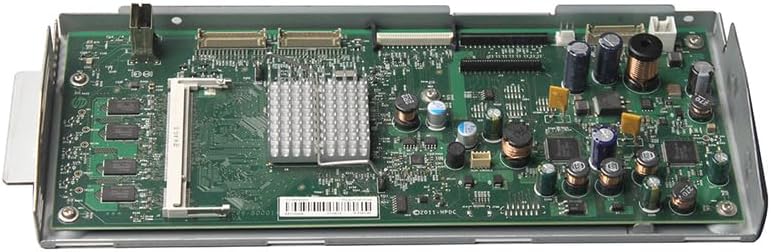
HP Color LaserJet Enterprise M880 Series Scanner Control Board (SCB) Assembly A2W75-67904
HP Color LaserJet Enterprise M880 Scanner Control Board
SCB Assembly • A2W75-67904
Restore communication and control of the scanning system in a compatible HP Color LaserJet Enterprise M880-series multifunction printer with this genuine HP scanner control board assembly. The SCB coordinates scanner-related electronics and communication between the printer, flatbed scanner and document-feeder scanning system.
Product Details
| Manufacturer | HP |
| HP Part Number | A2W75-67904 |
| Product Type | Scanner Control Board (SCB) Assembly |
| Brand | Genuine HP OEM |
| Condition | New Pull |
| Included | Scanner control board assembly shown in the product photographs |
Compatible Printer Models
Please confirm your complete printer model and part number before ordering. Compatible models include:
- HP Color LaserJet Enterprise Flow MFP M880z — A2W75A
- HP Color LaserJet Enterprise Flow MFP M880z+ — A2W76A
- HP Color LaserJet Enterprise Flow MFP M880z+ NFC/Wireless Direct — D7P71A
- HP Color LaserJet Managed Flow MFP M880zm — L3U51A
- HP Color LaserJet Managed Flow MFP M880zm+ — L3U52A
SCB Assembly Function
The scanner control board is responsible for coordinating and controlling important scanner-system operations, including:
- Communication between the scanner system and printer electronics
- Flatbed scanner control and scanner-head operation
- Communication with document-feeder scanning components
- Processing and coordination of scanner-system commands
- Scanner firmware and hardware initialization
What Is Included?
- One genuine HP scanner control board assembly
- HP part number A2W75-67904
- Only the component and attached items shown in the product photographs
What Is Not Included?
- Flatbed image scanner assembly
- Scanner housing or scanner glass
- Automatic document feeder or ADF assembly
- Printer formatter board
- Interconnect board or DC controller
- Cables, wire harnesses or mounting hardware unless pictured
- Printer or any component not shown in the photographs
Scanner Errors This Part May Help Address
A defective scanner control board may contribute to scanner initialization, firmware or internal communication errors, including:
- 30.01.45 — Internal scanner-system communication error
- 30.01.46 — Scanner firmware error
- 30.01.50 — Internal scanner control board error
- 30.03.20 — Communication problem involving the scanner electronics
- 30.03.45 — Scanner control board firmware assertion failure
- Scanner initialization failures or intermittent scanner communication
These symptoms may also be caused by firmware, loose or damaged cables, the image scanner assembly, document feeder, formatter or other printer components. Error codes alone do not guarantee that the scanner control board is defective. Proper diagnosis is strongly recommended before ordering.
Installation Information
Professional installation is strongly recommended. This is an electrostatic-sensitive circuit board and should be handled using proper ESD precautions. Disconnect the printer from power before beginning installation and verify that all scanner cables and connectors are correctly seated.
Following replacement, the printer may require firmware verification, scanner calibration or additional service diagnostics. Installation should be completed by an experienced printer technician familiar with HP Enterprise multifunction printers.
Frequently Asked Questions
Is this a remanufactured board?
No. This component is considered a new pull because it was removed from a new or unused printer.
Is this the printer formatter board?
No. This is the scanner control board. The formatter is a separate component and is not included.
Does this include the complete scanner assembly?
No. This listing is only for the scanner control board assembly shown in the product photographs.
Does this include cables or mounting hardware?
Only items shown in the product photographs are included. Please do not assume that additional cables, brackets or hardware are supplied.
Will this repair every scanner-related error?
No. Scanner errors may originate from several components. Proper diagnosis and connector inspection are recommended before replacing the SCB.
Couldn't load pickup availability
Pickup available at WAREHOUSE
Usually ready in 5+ daysPairs well with
In stock! Ships within 5-7 business days.
100% Tested prior to shipment
Warranty Included (1 Year, 2 Year, and 3 Year Extensions available on all Printers)
Lifetime technical support
HP Color LaserJet Enterprise M880 Series Scanner Control Board (SCB) Assembly A2W75-67904
Please visit our FAQs page or email Sales@theprinterdepo.com with any questions you may have.
-
Shipping Information
Most orders ship within 48 hours of receipt.
-
Customer Support
Please reach out to us via email or chat box Monday-Friday 8AM-5PM CST.
-
FAQ’s
Please click "Quick Links" at the bottom of the page & open "FAQ's" for more information.
-
Technical Support
All of our products include lifetime technical support via email.
FAQs
Please read our FAQs page to find out more.
How much is shipping?
- Shipping is free on all items below 65lbs
- If you are purchasing in bulk & the total weight exceeds 65lbs then please reach out to us through the chat box or email sales@theprinterdepo.com for a custom quote.
- If the item exceeds 65lbs then you may be subject to freight charges.
Do you charge sales tax?
- We do not collect sales tax outside of the state of Texas. Therefore, you do not need to provide any proof of exemption unless your shipping/billing address is in Texas.
- If you are located in Texas & would like your account to be tax exempt then you must email Sales@theprinterdepo.com your Texas resale certificate or proof of exemption.
Do you offer "Blind Drop Shipping"?
- Yes, we offer "Blind Drop Shipping" & "Private labeling".
- Please email Sales@theprinterdepo.com for more details.
Do you offer any discounts?
- Yes, please sign up for our weekly newsletter for upcoming sales, discount codes, and product announcements.
- Wholesalers should email sales@theprinterdepo.com for a custom quote.
Do you accept "Purchase Orders"?
- Yes, please send your PO's to sales@theprinterdepo.com
- Credit card or Net 30 application must be on file in order for your purchase order to be processed.