
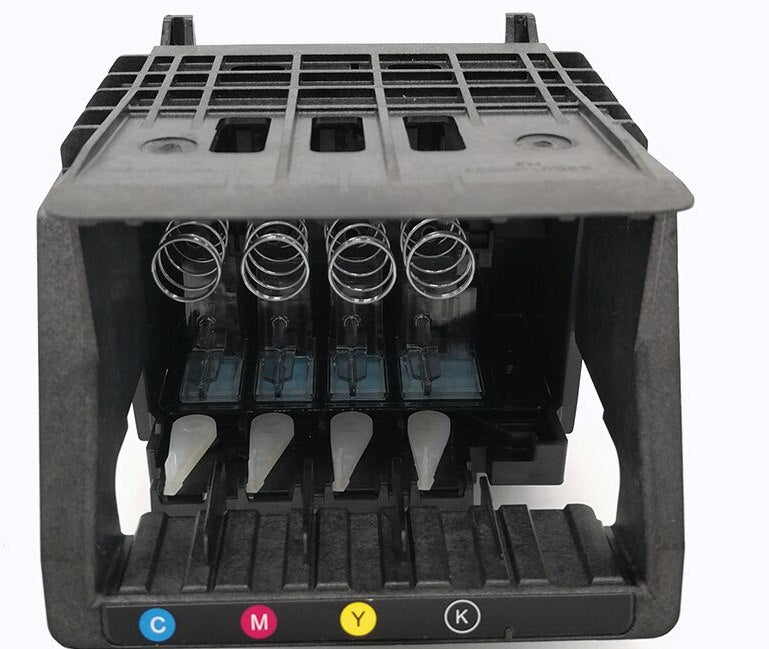
HP OfficeJet Pro 8710/8720/8725/8740/8745 Printhead, M0H91A M0H90A
HP OfficeJet Pro 8710, 8720, 8725, 8740 & 8745 Printhead
Replacement printhead assembly for compatible HP OfficeJet Pro printers using service part numbers M0H91A or M0H90A.
Restore Your Printer’s Ink Delivery System
This genuine OEM HP printhead assembly is designed for compatible HP OfficeJet Pro printers using the M0H91A or M0H90A printhead platform. The printhead receives ink from the installed black, cyan, magenta and yellow cartridges and precisely delivers it to the paper during printing.
A replacement printhead may help correct confirmed printhead-related failures, including persistent print-quality defects, missing colors, repeated printhead error messages or a printer that no longer recognizes its installed printhead. Because similar symptoms can also be caused by depleted cartridges, incompatible ink, damaged contacts or other printer components, proper diagnosis is recommended before ordering.
Product Features
Original HP hardware designed for the supported OfficeJet Pro print engine and four-color ink-delivery system.
Controls black, cyan, magenta and yellow ink delivery through one integrated printhead assembly.
Inspected and function-tested before shipment to verify proper electronic recognition and printhead operation.
Installs through the printer’s ink-cartridge access area without requiring extensive printer disassembly.
Designed to deliver sharp text, smooth graphics and consistent color when used with properly functioning ink cartridges.
The supplied assembly may be identified as M0H91A or M0H90A depending on its service or regional configuration.
Primary Compatible Models
Depending on the printer’s regional and production configuration, this printhead platform is also used in the following models:
- HP OfficeJet 8702 All-in-One
- HP OfficeJet Pro 7720 Wide Format
- HP OfficeJet Pro 7730 Wide Format
- HP OfficeJet Pro 7740 Wide Format
- HP OfficeJet Pro 8210
- HP OfficeJet Pro 8216
- HP OfficeJet Pro 8218
- HP OfficeJet Pro 8712
- HP OfficeJet Pro 8714
- HP OfficeJet Pro 8715
- HP OfficeJet Pro 8716
- HP OfficeJet Pro 8717
- HP OfficeJet Pro 8718
- HP OfficeJet Pro 8719
- HP OfficeJet Pro 8723
- HP OfficeJet Pro 8724
- HP OfficeJet Pro 8726
- HP OfficeJet Pro 8727
- HP OfficeJet Pro 8728
- HP OfficeJet Pro 8730
- HP OfficeJet Pro 8732M
- HP OfficeJet Pro 8734
- HP OfficeJet Pro 8735
- HP OfficeJet Pro 8736
- HP OfficeJet Managed MFP P27724dw
Model availability and regional configurations vary. Compatibility should be confirmed using the printer’s complete model and product number rather than appearance alone.
Product Specifications
| Printhead Details | |
|---|---|
| Product Type | Inkjet printhead assembly |
| Manufacturer | HP |
| Part Numbers | M0H91A / M0H90A |
| Alternate Reference | J3M72-60008 where applicable |
| Print Technology | Thermal inkjet |
| Ink Channels | Black, cyan, magenta and yellow |
| North American Ink Family | HP 952 / 952XL, depending on printer configuration |
| Installation Location | Ink-carriage assembly beneath the cartridge access door |
| Included | One printhead assembly |
| Ink Cartridges | Not included unless specifically pictured or stated |
Installation Overview
- Confirm that the printer model and replacement printhead are compatible.
- Open the cartridge-access door and allow the ink carriage to move into its service position.
- Remove all installed ink cartridges and place them upright on a protected surface.
- Release the printhead carriage latch and carefully remove the existing printhead.
- Install the replacement printhead without touching the electrical contacts or ink nozzles.
- Lock the carriage latch, reinstall the cartridges and close the access door.
- Allow the printer to complete its initialization, alignment and print-quality processes.
When Printhead Replacement May Be Appropriate
- Persistent “Missing or Failed Printhead” messages after standard troubleshooting
- Printhead detection or electrical communication errors
- One or more colors remain completely absent after cleaning and cartridge replacement
- Severe streaking, banding or blank output traced to the printhead
- Visible damage, corrosion or contamination on the existing printhead
Couldn't load pickup availability
Pickup available at WAREHOUSE
Usually ready in 5+ daysPairs well with
In stock! Ships within 5-7 business days.
100% Tested prior to shipment
Warranty Included (1 Year, 2 Year, and 3 Year Extensions available on all Printers)
Lifetime technical support
HP OfficeJet Pro 8710/8720/8725/8740/8745 Printhead, M0H91A M0H90A
Please visit our FAQs page or email Sales@theprinterdepo.com with any questions you may have.
-
Shipping Information
Most orders ship within 48 hours of receipt.
-
Customer Support
Please reach out to us via email or chat box Monday-Friday 8AM-5PM CST.
-
FAQ’s
Please click "Quick Links" at the bottom of the page & open "FAQ's" for more information.
-
Technical Support
All of our products include lifetime technical support via email.
FAQs
Please read our FAQs page to find out more.
How much is shipping?
- Shipping is free on all items below 65lbs
- If you are purchasing in bulk & the total weight exceeds 65lbs then please reach out to us through the chat box or email sales@theprinterdepo.com for a custom quote.
- If the item exceeds 65lbs then you may be subject to freight charges.
Do you charge sales tax?
- We do not collect sales tax outside of the state of Texas. Therefore, you do not need to provide any proof of exemption unless your shipping/billing address is in Texas.
- If you are located in Texas & would like your account to be tax exempt then you must email Sales@theprinterdepo.com your Texas resale certificate or proof of exemption.
Do you offer "Blind Drop Shipping"?
- Yes, we offer "Blind Drop Shipping" & "Private labeling".
- Please email Sales@theprinterdepo.com for more details.
Do you offer any discounts?
- Yes, please sign up for our weekly newsletter for upcoming sales, discount codes, and product announcements.
- Wholesalers should email sales@theprinterdepo.com for a custom quote.
Do you accept "Purchase Orders"?
- Yes, please send your PO's to sales@theprinterdepo.com
- Credit card or Net 30 application must be on file in order for your purchase order to be processed.