
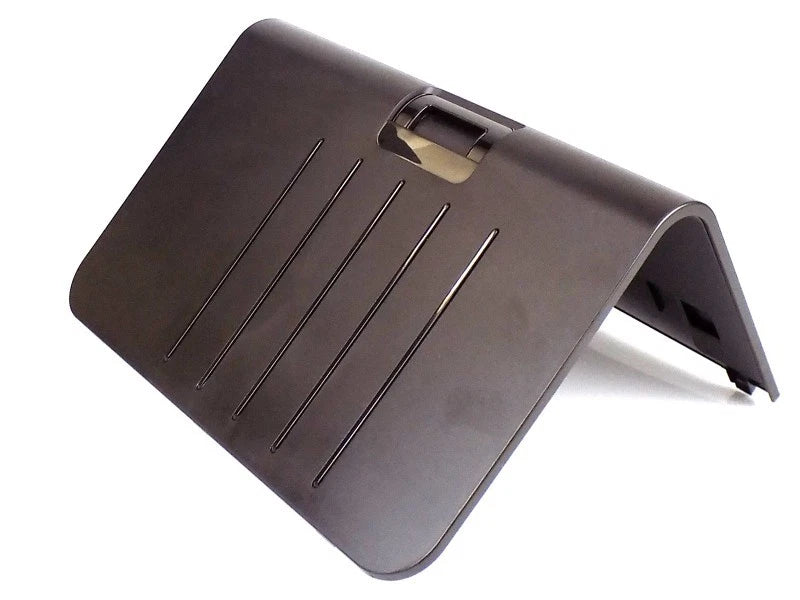
HP OfficeJet Pro X451/X476/X551/X576 Paper Output Bin Assembly – CN598-67007
HP OfficeJet Pro Replacement Part
Give every page
a proper landing.
Paper Output Bin Assembly
Replace a cracked, damaged, or missing output bin and restore the receiving area for finished prints on compatible HP OfficeJet Pro X-series printers.
Restore your printer’s output area.
The HP CN598-67007 Paper Output Bin Assembly is the replacement receiving bin for compatible HP OfficeJet Pro X451, X476, X551, and X576 models. It supports completed pages as they exit the printer and provides a convenient place to collect printed documents.
A damaged or missing bin can leave finished pages without proper support. Replacing the affected assembly restores the printer’s physical output area while keeping your existing printer in service.
Support finished documents.
Provides the receiving surface for pages leaving the printer. Suitable for replacing an output bin with cracks, broken mounting features, or other physical damage that prevents it from seating or supporting paper correctly.
Match the exact service part.
Identified by CN598-67007, this assembly serves both the listed single-function printers and multifunction models. Match your printer model and replacement part number before ordering.
Compatible HP printers.
| Printer model | Printer product number | Device type |
|---|---|---|
| HP OfficeJet Pro X451dn | CN459A | Printer |
| HP OfficeJet Pro X451dw | CN463A | Printer |
| HP OfficeJet Pro X476dn MFP | CN460A | Multifunction printer |
| HP OfficeJet Pro X476dw MFP | CN461A | Multifunction printer |
| HP OfficeJet Pro X551dw | CV037A | Printer |
| HP OfficeJet Pro X576dw MFP | CN598A | Multifunction printer |
Compatibility note: These are HP OfficeJet Pro X-series devices. Similar model names or appearance do not establish compatibility with other OfficeJet, PageWide, or LaserJet printers. Confirm your exact model against the table above.
Product specifications.
| Product name | Paper Output Bin Assembly |
|---|---|
| Service part number | CN598-67007 |
| Service description | Output bin |
| Function | Receives and supports completed pages as they exit the printer |
| Compatible families | HP OfficeJet Pro X451, X476, X551, and X576 |
| Replacement application | Missing, cracked, damaged, or improperly supported output bin |
| Listing item | One CN598-67007 paper output bin assembly |
Select the correct output component.
CN598-67007 identifies the output bin. HP lists the eject flap assembly, CN598-67023, and output drive kit, CN598-67022, as separate service parts.
If the problem involves powered paper ejection, an internal drive mechanism, or the eject flap, identify the affected component before ordering. An output bin replacement addresses damage to the receiving bin itself.
Replacement guidance.
- Verify the match. Confirm your printer model and compare the existing assembly with CN598-67007.
- Prepare the printer. Turn it off, disconnect power, and remove paper from the output area.
- Follow the model-specific procedure. Use the appropriate HP service instructions for output bin removal and installation. Avoid forcing plastic tabs or mounting points.
- Check the result. Confirm the bin is seated securely, then print a small test job and check that pages exit and rest in the bin correctly.
Restore the finishing touch.
HP OfficeJet Pro Paper Output Bin Assembly
CN598-67007
For X451dn, X451dw, X476dn, X476dw, X551dw, and X576dw.
Printer models and product numbers identify compatibility; printers are not included. HP and OfficeJet are trademarks of their respective owners.
Couldn't load pickup availability
Pickup available at WAREHOUSE
Usually ready in 5+ daysPairs well with
In stock! Ships within 5-7 business days.
100% Tested prior to shipment
Warranty Included (1 Year, 2 Year, and 3 Year Extensions available on all Printers)
Lifetime technical support
HP OfficeJet Pro X451/X476/X551/X576 Paper Output Bin Assembly – CN598-67007
Please visit our FAQs page or email Sales@theprinterdepo.com with any questions you may have.
-
Shipping Information
Most orders ship within 48 hours of receipt.
-
Customer Support
Please reach out to us via email or chat box Monday-Friday 8AM-5PM CST.
-
FAQ’s
Please click "Quick Links" at the bottom of the page & open "FAQ's" for more information.
-
Technical Support
All of our products include lifetime technical support via email.
FAQs
Please read our FAQs page to find out more.
How much is shipping?
- Shipping is free on all items below 65lbs
- If you are purchasing in bulk & the total weight exceeds 65lbs then please reach out to us through the chat box or email sales@theprinterdepo.com for a custom quote.
- If the item exceeds 65lbs then you may be subject to freight charges.
Do you charge sales tax?
- We do not collect sales tax outside of the state of Texas. Therefore, you do not need to provide any proof of exemption unless your shipping/billing address is in Texas.
- If you are located in Texas & would like your account to be tax exempt then you must email Sales@theprinterdepo.com your Texas resale certificate or proof of exemption.
Do you offer "Blind Drop Shipping"?
- Yes, we offer "Blind Drop Shipping" & "Private labeling".
- Please email Sales@theprinterdepo.com for more details.
Do you offer any discounts?
- Yes, please sign up for our weekly newsletter for upcoming sales, discount codes, and product announcements.
- Wholesalers should email sales@theprinterdepo.com for a custom quote.
Do you accept "Purchase Orders"?
- Yes, please send your PO's to sales@theprinterdepo.com
- Credit card or Net 30 application must be on file in order for your purchase order to be processed.