
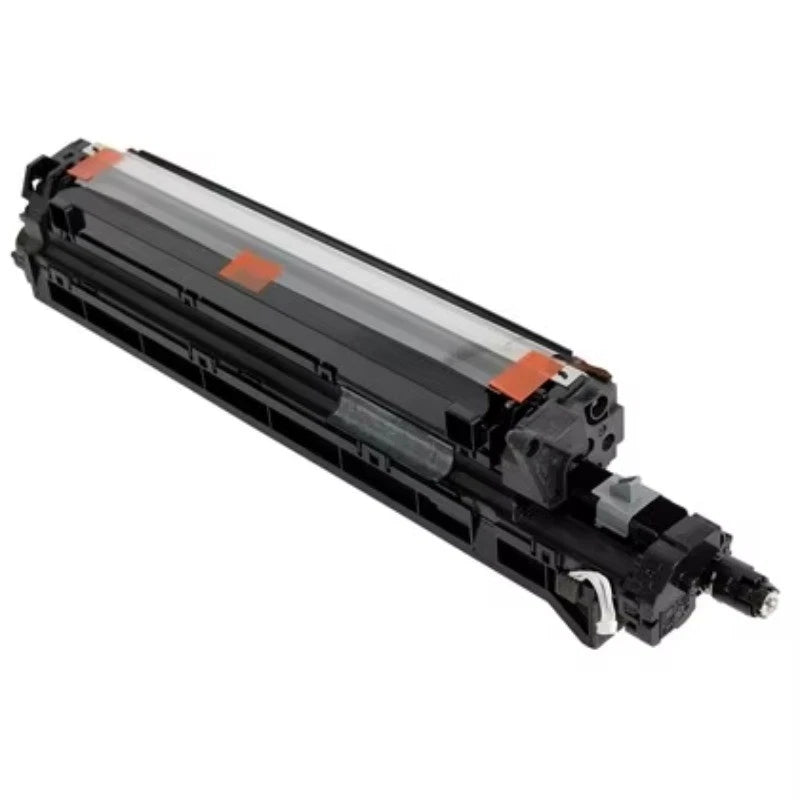
Kyocera TASKalfa 3500i/4500i/5500i/3501i/4501i/5501i Developer Unit – DV-6305 / 302LH93034
Kyocera TASKalfa • Black Developer Unit
Precision starts
with development.
The DV-6305 developer unit is an essential part of the monochrome imaging system in compatible Kyocera TASKalfa multifunction printers.
Match the model. Confirm the part. This listing identifies the DV-6305 developer unit, with 302LH93034 as the primary part-number reference. Before ordering, compare your machine model and existing unit label. If you require a particular revision, confirm that exact number before purchase.
An essential stage of every printed page.
The developer unit presents toner to the imaging drum, developing the image that will be transferred to paper. Proper operation supports consistent black density, readable text, and uniform monochrome output.
The DV-6305 is a service replacement for supported TASKalfa systems when diagnosis identifies the developer assembly as the source of an imaging problem. It is a distinct component from the toner container, drum unit, and fuser assembly.
Support consistent output.
A correctly functioning developer unit supports even toner development across printed and copied pages. Replacement may address developer-related image defects after the underlying cause has been confirmed.
Replace the right component.
Faint output, uneven density, and background contamination can have several causes. Check the toner supply, drum, and other imaging components before selecting a developer-unit replacement.
Compatible Kyocera models.
| Brand | Exact model |
|---|---|
| Kyocera | TASKalfa 3500i |
| Kyocera | TASKalfa 4500i |
| Kyocera | TASKalfa 5500i |
| Kyocera | TASKalfa 3501i |
| Kyocera | TASKalfa 4501i |
| Kyocera | TASKalfa 5501i |
Additional documented Copystar models.
| Brand | Exact model | Parts-list reference |
|---|---|---|
| Copystar | CS 3501i | DV-6305 / 302LH93034 |
| Copystar | CS 4501i | DV-6305 / 302LH93034 |
| Copystar | CS 5501i | DV-6305 / 302LH93034 |
Part numbers, clearly identified.
| Part or designation | Identification |
|---|---|
| DV-6305 / DV6305 | Developer-unit designation; both spellings refer to the same designation. |
| 302LH93034 | Primary listing reference. Identified as DV-6305 in manufacturer parts documentation. |
| 302LH93035 | Documented DV-6305 part number in Kyocera's June 2019 parts list. |
| 302LH93037 | Documented DV-6305 developer-unit part number in Kyocera's September 2024 parts list. |
Part numbers identify documented versions of the DV-6305 family. They do not mean that every listed revision is included or available. The exact revision required should be checked against the machine's applicable parts information.
Before you order.
- Match the complete printer model, including the final i. Similar model numbers and color-model suffixes do not establish compatibility.
- Check the existing developer-unit label and the applicable regional parts catalog when confirming a replacement.
- 302LH93036 requires separate confirmation. It has not been independently verified here in manufacturer documentation and is not presented as a confirmed replacement number.
- Do not use the DV-6305 designation as a substitute for a toner-container, drum-unit, or complete maintenance-kit part number.
Install with the correct service procedure.
Installation by a qualified copier technician is recommended. Follow the service manual for the exact machine, including safe removal, handling, seating, and any developer setup required for the replacement being installed.
Developer initialization is a service procedure that must match the unit's actual preparation. Confirm developer-material requirements before installation, and perform the prescribed image-quality checks afterward.
The right unit for the right machine.
Kyocera DV-6305 Black Developer Unit
Primary reference: 302LH93034 • Verify your model and required revision before ordering.
Kyocera, TASKalfa, and Copystar are trademarks of their respective owners. Model and part-number references are provided for product identification. Regional configurations and service revisions may differ.
Couldn't load pickup availability
Pickup available at WAREHOUSE
Usually ready in 5+ daysPairs well with
In stock! Ships within 5-7 business days.
100% Tested prior to shipment
Warranty Included (1 Year, 2 Year, and 3 Year Extensions available on all Printers)
Lifetime technical support
Kyocera TASKalfa 3500i/4500i/5500i/3501i/4501i/5501i Developer Unit – DV-6305 / 302LH93034
Please visit our FAQs page or email Sales@theprinterdepo.com with any questions you may have.
-
Shipping Information
Most orders ship within 48 hours of receipt.
-
Customer Support
Please reach out to us via email or chat box Monday-Friday 8AM-5PM CST.
-
FAQ’s
Please click "Quick Links" at the bottom of the page & open "FAQ's" for more information.
-
Technical Support
All of our products include lifetime technical support via email.
FAQs
Please read our FAQs page to find out more.
How much is shipping?
- Shipping is free on all items below 65lbs
- If you are purchasing in bulk & the total weight exceeds 65lbs then please reach out to us through the chat box or email sales@theprinterdepo.com for a custom quote.
- If the item exceeds 65lbs then you may be subject to freight charges.
Do you charge sales tax?
- We do not collect sales tax outside of the state of Texas. Therefore, you do not need to provide any proof of exemption unless your shipping/billing address is in Texas.
- If you are located in Texas & would like your account to be tax exempt then you must email Sales@theprinterdepo.com your Texas resale certificate or proof of exemption.
Do you offer "Blind Drop Shipping"?
- Yes, we offer "Blind Drop Shipping" & "Private labeling".
- Please email Sales@theprinterdepo.com for more details.
Do you offer any discounts?
- Yes, please sign up for our weekly newsletter for upcoming sales, discount codes, and product announcements.
- Wholesalers should email sales@theprinterdepo.com for a custom quote.
Do you accept "Purchase Orders"?
- Yes, please send your PO's to sales@theprinterdepo.com
- Credit card or Net 30 application must be on file in order for your purchase order to be processed.