
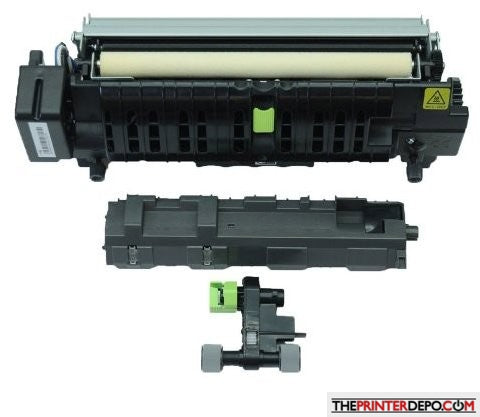
Lexmark CX737/CS730/CS737/CX730/CX735 Fuser Maintenance Kit 41X3882
Lexmark CS730 / CS735 / CX730 / CX735 Fuser Maintenance Kit
A comprehensive maintenance solution designed to restore reliable toner bonding, paper separation, and media pickup performance in compatible Lexmark color printers and multifunction devices.
Lexmark identifies 41X4511 as the required 115V narrow-media fuser maintenance kit for the CS737 and CX737.
Do not order 41X3882 for a CS737 or CX737 without first verifying the required fuser type and part number.
Product Overview
The fuser uses controlled heat and pressure to permanently bond toner to the page. The accompanying separator and pickup components help move media smoothly through the printer. Replacing these related wear items together provides more complete preventive maintenance than replacing the fuser alone.
This kit may be appropriate when the printer displays a maintenance or fuser replacement message or experiences symptoms associated with worn fuser and paper-feed components.
Maintenance Kit Components
Bonds toner to the page using controlled heat and pressure.
Assists with reliable sheet separation and paper feeding.
Helps restore consistent media pickup from the paper tray.
Kit contents should be confirmed against the listing photographs and packaging received before installation.
Product Details
| Product Type | Fuser Maintenance Kit |
| Part Number | 41X3882 |
| Operating Voltage | 110–120V |
| Primary Function | Fusing, separation, and paper-pickup maintenance |
| Installation Location | Fuser area and applicable paper-input tray |
Standard 110–120V Compatibility
Compatibility can vary by region, printer voltage, and fuser type. Confirm the printer’s complete model number and voltage label before ordering.
Other Fuser Maintenance Kit Versions
| Part Number | Configuration |
|---|---|
| 41X3882 | 110–120V standard kit — this listing |
| 41X3883 | 220–240V kit |
| 41X3884 | 100V kit |
| 41X4511 | 115V narrow-media kit required for CS737 and CX737 |
Common Reasons for Replacement
These symptoms may also be caused by other printer components. Diagnose the printer and verify the required part number before ordering.
General Installation Overview
- Turn off the printer and disconnect it from the electrical outlet.
- Allow the internal components and existing fuser to cool completely.
- Open printer doors A and A1 to access the fuser area.
- Rotate the fuser locking knobs counterclockwise and remove the used fuser.
- Insert the replacement fuser and rotate the locking knobs clockwise.
- Replace the included pickup roller and separator components where applicable.
- Close all doors, reconnect the printer, and turn it on.
- Reset the maintenance counter after the complete kit has been installed.
Maintenance Counter Reset
After installing the complete maintenance kit, the counter can generally be accessed through:
Menu wording may vary by printer model or firmware version. Reset the counter only after the appropriate maintenance components have been replaced.
Kit Includes
- Fuser assembly
- Separator assembly
- Pickup roller assembly
Not Included
- Printer or multifunction device
- Toner cartridges
- Imaging units or imaging kit
- Waste-toner container
- Transfer belt or unrelated assemblies
Couldn't load pickup availability
Pickup available at WAREHOUSE
Usually ready in 5+ daysPairs well with
In stock! Ships within 5-7 business days.
100% Tested prior to shipment
Warranty Included (1 Year, 2 Year, and 3 Year Extensions available on all Printers)
Lifetime technical support
Lexmark CX737/CS730/CS737/CX730/CX735 Fuser Maintenance Kit 41X3882
Please visit our FAQs page or email Sales@theprinterdepo.com with any questions you may have.
-
Shipping Information
Most orders ship within 48 hours of receipt.
-
Customer Support
Please reach out to us via email or chat box Monday-Friday 8AM-5PM CST.
-
FAQ’s
Please click "Quick Links" at the bottom of the page & open "FAQ's" for more information.
-
Technical Support
All of our products include lifetime technical support via email.
FAQs
Please read our FAQs page to find out more.
How much is shipping?
- Shipping is free on all items below 65lbs
- If you are purchasing in bulk & the total weight exceeds 65lbs then please reach out to us through the chat box or email sales@theprinterdepo.com for a custom quote.
- If the item exceeds 65lbs then you may be subject to freight charges.
Do you charge sales tax?
- We do not collect sales tax outside of the state of Texas. Therefore, you do not need to provide any proof of exemption unless your shipping/billing address is in Texas.
- If you are located in Texas & would like your account to be tax exempt then you must email Sales@theprinterdepo.com your Texas resale certificate or proof of exemption.
Do you offer "Blind Drop Shipping"?
- Yes, we offer "Blind Drop Shipping" & "Private labeling".
- Please email Sales@theprinterdepo.com for more details.
Do you offer any discounts?
- Yes, please sign up for our weekly newsletter for upcoming sales, discount codes, and product announcements.
- Wholesalers should email sales@theprinterdepo.com for a custom quote.
Do you accept "Purchase Orders"?
- Yes, please send your PO's to sales@theprinterdepo.com
- Credit card or Net 30 application must be on file in order for your purchase order to be processed.