
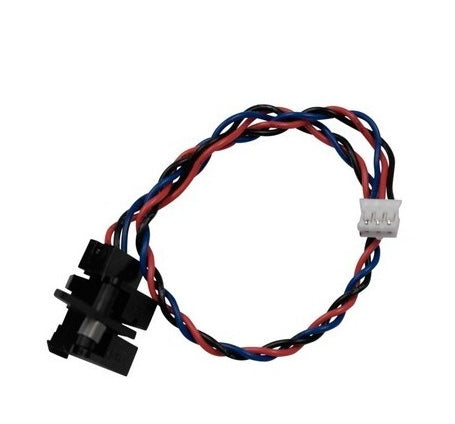
Lexmark MS710/MS810/MX710/MX810 Series Mailbox Pass-Through Sensor 40X8719 – Genuine OEM
This is the pass-through sensor installed inside the compatible optional multi-bin mailbox assembly. It is not the standard printer output-bin sensor and should not be confused with output-expander pass-through sensor 40X8729. Your device must be equipped with the applicable mailbox accessory.
Precise Media Detection
Detects media as it passes through the mailbox paper path and provides the timing feedback required for proper output routing.
OEM Fit and Function
Manufactured for the original Lexmark mailbox architecture, helping preserve proper alignment, connection and sensor response.
Broad Platform Support
Used across multiple generations of Lexmark enterprise printers, multifunction devices and managed-print platforms.
Product Information
Designed for Lexmark enterprise mailbox systems.
Compatibility includes the following printer families and their applicable regional or configuration variants when equipped with the compatible mailbox output option.
Lexmark Monochrome Printers
B2865 / B2865dw
M5155, M5163, M5170
M5255, M5265, M5270
MS710 / MS710dn
MS711 / MS711dn
MS725 / MS725dvn
MS810 Series
MS811 Series
MS812 Series
MS817 Series
MS818 Series
MS821 Series
MS822 Series
MS823 Series
MS824 Series
MS825 Series
MS826 Series
Lexmark Multifunction Printers
MB2770 / MB2770adwhe
MX710 Series
MX711 Series
MX717 Series
MX718 Series
MX721 Series
MX722 Series
MX725 Series
MX810 Series
MX811 Series
MX812 Series
MX822 Series
MX824 Series
MX826 Series
Lexmark Managed Devices
XM5163, XM5170
XM5263, XM5270
XM5365, XM5370
XM7155, XM7163, XM7170
XM7263, XM7270
XM7355, XM7365, XM7370
OEM-Platform Cross References
Parts-catalog references also associate this component with the Sharp MX-B557P, Sharp MX-B707P and Source Technologies ST9730 platforms. For cross-branded equipment, confirm the installed sensor number and mailbox configuration before ordering.
Symptoms This Part May Address
- Recurring paper jams inside the mailbox
- False pass-through or paper-path jam messages
- Media stopping before reaching the selected bin
- Intermittent mailbox output errors
- Incorrect timing or routing through the mailbox
Before Replacing
- Confirm the mailbox sensor flag moves freely
- Inspect the paper path for scraps or debris
- Check that the sensor cable is fully seated
- Inspect the diverters, belts and drive components
- Verify the installed part number is 40X8719
What’s Included
One genuine Lexmark 40X8719 mailbox pass-through sensor, as pictured.
Not Included
Mailbox assembly, sensor actuator or flag, wiring harness, controller board, belts, solenoids and other components are not included unless specifically pictured or stated.
Installation
Installation requires access to the optional mailbox assembly. Disconnect the printer and all attached output accessories from power before service. Proper handling, electrostatic-discharge precautions and installation by an experienced printer technician are recommended.
Compatibility notice: Printer model alone does not confirm that this sensor is installed. Please verify that the device has the compatible multi-bin mailbox accessory and match part number 40X8719 to the original component before purchasing.
Condition note: This genuine OEM component is considered a “New Pull” and was carefully removed from a like-new device. Minimal evidence of prior installation or handling may be present without affecting fit or intended function.
Couldn't load pickup availability
Pickup available at WAREHOUSE
Usually ready in 5+ daysPairs well with
In stock! Ships within 5-7 business days.
100% Tested prior to shipment
Warranty Included (1 Year, 2 Year, and 3 Year Extensions available on all Printers)
Lifetime technical support
Lexmark MS710/MS810/MX710/MX810 Series Mailbox Pass-Through Sensor 40X8719 – Genuine OEM
Please visit our FAQs page or email Sales@theprinterdepo.com with any questions you may have.
-
Shipping Information
Most orders ship within 48 hours of receipt.
-
Customer Support
Please reach out to us via email or chat box Monday-Friday 8AM-5PM CST.
-
FAQ’s
Please click "Quick Links" at the bottom of the page & open "FAQ's" for more information.
-
Technical Support
All of our products include lifetime technical support via email.
FAQs
Please read our FAQs page to find out more.
How much is shipping?
- Shipping is free on all items below 65lbs
- If you are purchasing in bulk & the total weight exceeds 65lbs then please reach out to us through the chat box or email sales@theprinterdepo.com for a custom quote.
- If the item exceeds 65lbs then you may be subject to freight charges.
Do you charge sales tax?
- We do not collect sales tax outside of the state of Texas. Therefore, you do not need to provide any proof of exemption unless your shipping/billing address is in Texas.
- If you are located in Texas & would like your account to be tax exempt then you must email Sales@theprinterdepo.com your Texas resale certificate or proof of exemption.
Do you offer "Blind Drop Shipping"?
- Yes, we offer "Blind Drop Shipping" & "Private labeling".
- Please email Sales@theprinterdepo.com for more details.
Do you offer any discounts?
- Yes, please sign up for our weekly newsletter for upcoming sales, discount codes, and product announcements.
- Wholesalers should email sales@theprinterdepo.com for a custom quote.
Do you accept "Purchase Orders"?
- Yes, please send your PO's to sales@theprinterdepo.com
- Credit card or Net 30 application must be on file in order for your purchase order to be processed.