
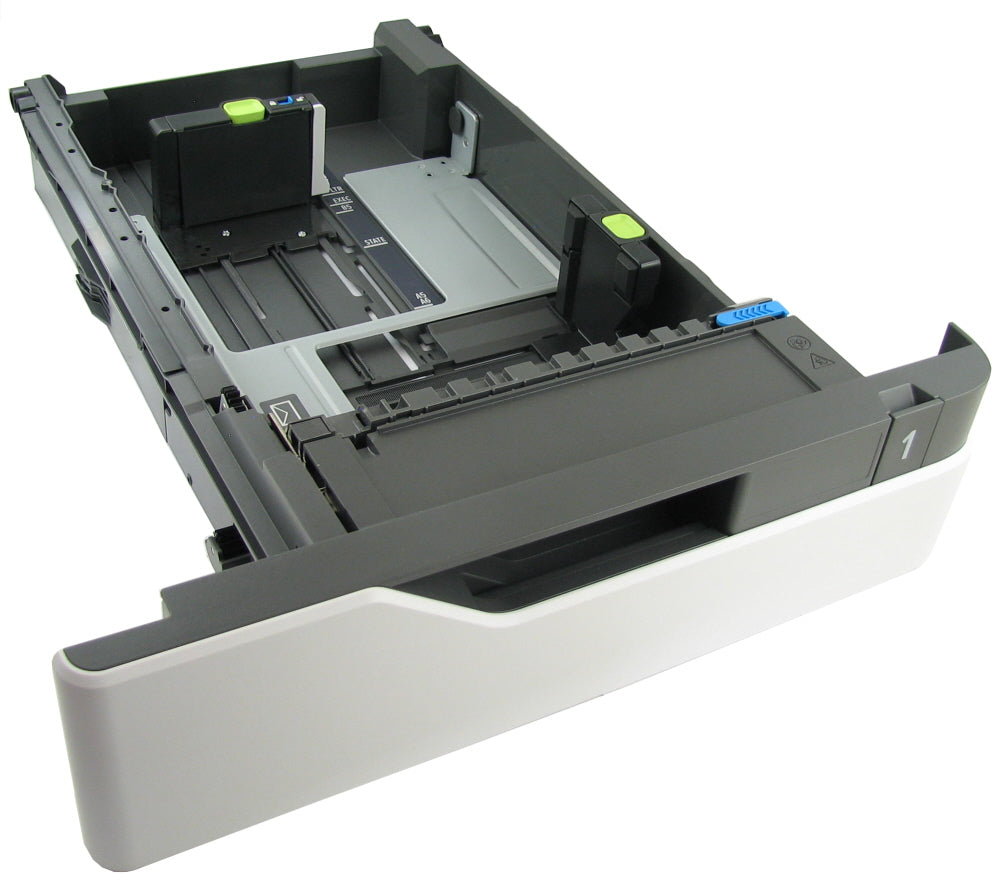
Lexmark MS823/MS725/MS821/MX725/XM5370 OEM 550-Sheet Tray Insert 41X1118
Genuine Lexmark OEM Paper-Handling Component
Lexmark 550-Sheet Tray Insert
Replacement paper cassette for select Lexmark MS, MX, XM, MB, B, and M-series printers.
Tray Insert Only
This product is the removable 550-sheet paper tray/cassette insert. It is not the complete optional paper-feeder assembly, printer cabinet, or printer itself. Please inspect your existing tray and confirm that the tray insert is the component requiring replacement.
Restore Reliable Paper Storage and Feeding
The Lexmark 41X1118 is an OEM replacement 550-sheet tray insert designed for select Lexmark monochrome laser printers and multifunction devices. The tray holds and positions media before it enters the printer’s paper-feeding system.
A damaged, cracked, warped, or improperly seating tray may contribute to paper-feed interruptions, skewed pages, incorrect media positioning, or difficulty loading and adjusting paper. Replacing the affected tray can help restore proper media alignment and dependable operation.
Product Details
| Manufacturer | Lexmark |
| Part Number | 41X1118 |
| Product Type | Paper tray/cassette insert |
| Paper Capacity | Up to 550 sheets |
| Printer Section | Paper input and media handling |
| Replacement Type | OEM tray insert |
Compatible Lexmark Printers
Verify the complete model designation shown on your printer:
Reasons to Replace the Tray Insert
- Tray is cracked, warped, or physically damaged
- Paper guides are broken, loose, or difficult to adjust
- Tray does not slide or seat correctly
- Media is not held squarely inside the cassette
- Pages repeatedly feed crooked from the affected tray
- Existing tray is missing or no longer usable
Paper-feed problems may also be caused by pickup rollers, separation rollers, sensors, guides, or the paper-feeder mechanism. Inspect the printer before ordering.
This Product
The removable paper tray or cassette that holds and positions the media.
Not Included
The complete optional paper-feeder housing, feeder electronics, printer, stand, cabinet, or additional accessories.
Installation and Setup
- Remove all paper from the damaged or existing tray.
- Pull the old tray completely out of the printer or feeder.
- Adjust the replacement tray’s paper guides for the media size being loaded.
- Load paper below the indicated maximum-fill line.
- Slide the tray straight into the printer until it is fully seated.
Do not force the tray into position. If it does not slide smoothly, remove it and verify that the guides, media, and tray alignment are correct.
For Best Paper-Handling Performance
- Use only media sizes and weights supported by the printer.
- Adjust the paper guides so they lightly contact the media without bending it.
- Do not exceed the tray’s maximum-fill indicator.
- Keep paper dry, flat, and properly stored.
- Set the corresponding paper size and type on the printer after loading the tray.
Confirm Compatibility Before Ordering
Match part number 41X1118 with the replacement part required for your printer and verify the complete model designation on the device. Please select or provide your exact printer model before shipment.
Couldn't load pickup availability
Pickup available at WAREHOUSE
Usually ready in 5+ daysPairs well with
In stock! Ships within 5-7 business days.
100% Tested prior to shipment
Warranty Included (1 Year, 2 Year, and 3 Year Extensions available on all Printers)
Lifetime technical support
Lexmark MS823/MS725/MS821/MX725/XM5370 OEM 550-Sheet Tray Insert 41X1118
Please visit our FAQs page or email Sales@theprinterdepo.com with any questions you may have.
-
Shipping Information
Most orders ship within 48 hours of receipt.
-
Customer Support
Please reach out to us via email or chat box Monday-Friday 8AM-5PM CST.
-
FAQ’s
Please click "Quick Links" at the bottom of the page & open "FAQ's" for more information.
-
Technical Support
All of our products include lifetime technical support via email.
FAQs
Please read our FAQs page to find out more.
How much is shipping?
- Shipping is free on all items below 65lbs
- If you are purchasing in bulk & the total weight exceeds 65lbs then please reach out to us through the chat box or email sales@theprinterdepo.com for a custom quote.
- If the item exceeds 65lbs then you may be subject to freight charges.
Do you charge sales tax?
- We do not collect sales tax outside of the state of Texas. Therefore, you do not need to provide any proof of exemption unless your shipping/billing address is in Texas.
- If you are located in Texas & would like your account to be tax exempt then you must email Sales@theprinterdepo.com your Texas resale certificate or proof of exemption.
Do you offer "Blind Drop Shipping"?
- Yes, we offer "Blind Drop Shipping" & "Private labeling".
- Please email Sales@theprinterdepo.com for more details.
Do you offer any discounts?
- Yes, please sign up for our weekly newsletter for upcoming sales, discount codes, and product announcements.
- Wholesalers should email sales@theprinterdepo.com for a custom quote.
Do you accept "Purchase Orders"?
- Yes, please send your PO's to sales@theprinterdepo.com
- Credit card or Net 30 application must be on file in order for your purchase order to be processed.